
AI baby videos are short clips featuring digitally generated or animated baby characters created entirely from a photo, a text prompt, or both. No filming. No real babies required. The fastest way to make one right now:
- Pick a tool (best options listed below)
- Upload a photo or type a prompt
- Choose a style or audio clip
- Generate and post
That’s it. The rest of this guide explains everything else, which tool to use, why these videos go viral, what the top creators are doing, and how to stay ethical.
What Are AI Baby Videos?
AI baby videos use generative AI to create animated baby characters that talk, dance, react, or perform. Both types produce shareable, short-form content optimized for TikTok, Instagram Reels, and YouTube Shorts. There are two main types:
AI-Generated Baby Characters
Created entirely from text prompts or uploaded images—no real person involved. Tools like Leonardo AI, Filmora, and ImagineArt generate these from scratch.
AI-Animated Real Baby Photos
A real baby photo is uploaded, and the AI animates it to talk, lip-sync, or dance. Tools like Hedra, Dreamina, and Revid.ai specialize in this.
Why AI Baby Videos Go Viral
But understanding why this content spreads is what separates creators who get 200 views from those who get 2 million.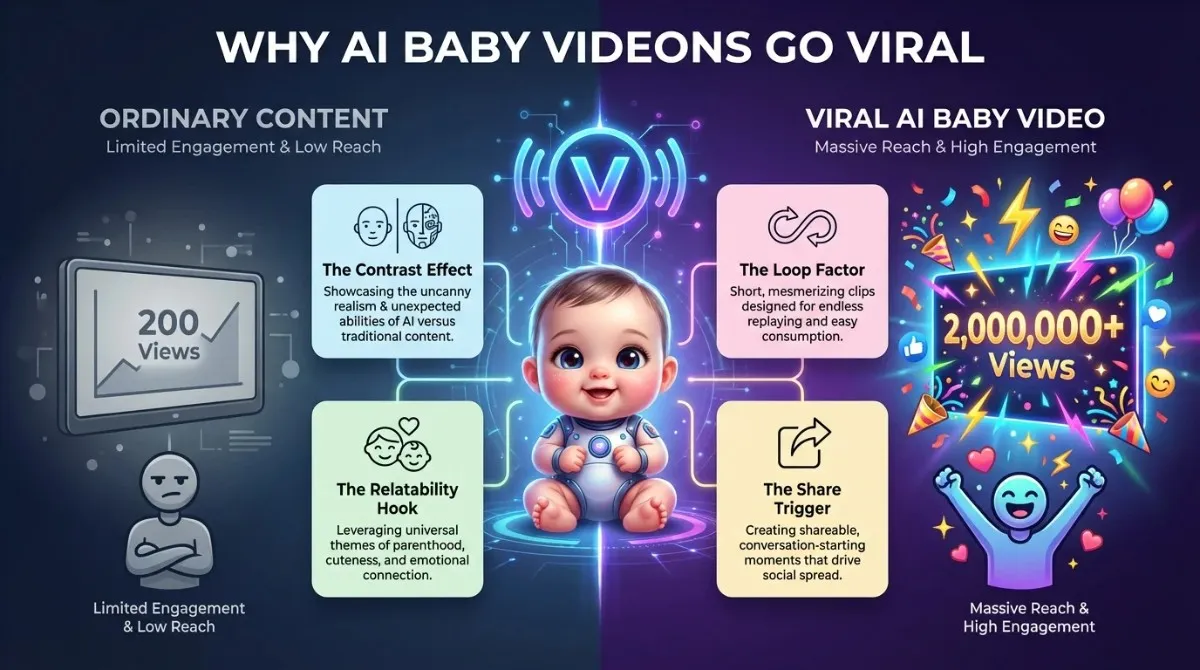
The Contrast Effect
A baby’s innocent face doing something adult, such as rapping, arguing, delivering a motivational speech, or playing poker, triggers an instant psychological response. The brain notices the mismatch. That noticeability equals engagement.
The Loop Factor
Good AI baby videos are 6–15 seconds long. They’re short enough to loop automatically on TikTok. Each loop counts as a re-watch. Rewatches signal quality to the algorithm.
The Relatability Hook
The best-performing clips pair the baby character with a universal experience. Mondays. Bad Wi-Fi. Running out of coffee. The baby becomes a mascot for the viewer’s own emotions.
The Share Trigger
People share what makes them look funny, relatable, or in the know. AI baby videos do all three. It’s the digital equivalent of sending a meme to a friend.
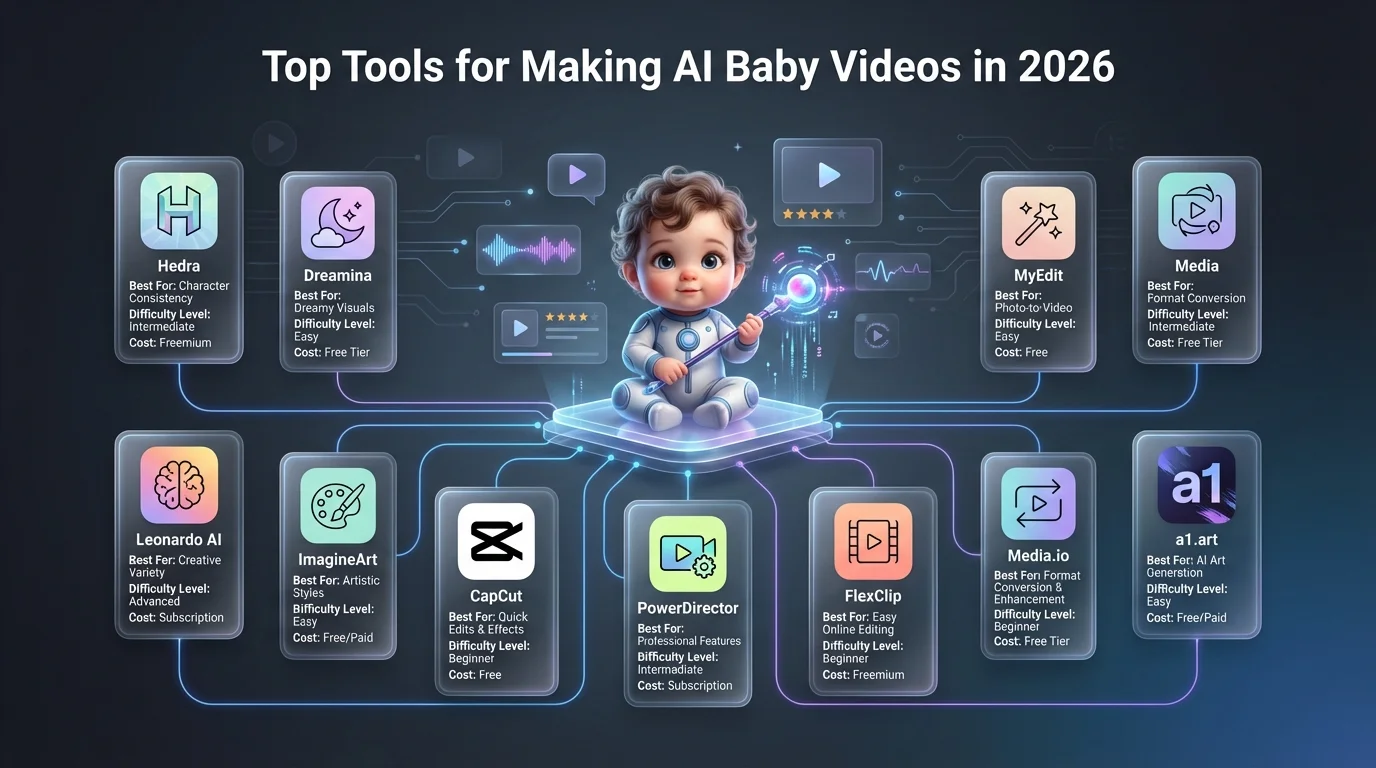
The Top Tools for Making AI Baby Videos in 2026
Here is an honest breakdown—no paid placements. No fluff.
1. Hedra
Best for: lip-sync and talking-baby videos. How it works: Upload a baby image. Upload an audio clip. Hedra animates the face to match the audio with facial mapping technology. Difficulty: Beginner Cost: Free tier available Best for creating: Podcast parodies, comedy skits, baby “interviews.”
2. Dreamina (by CapCut)
Best for: Full talking baby creation with built-in templates. How it works: Combines image generation with lip-sync and motion. Works especially well for batch creation. Difficulty: Beginner to intermediate Cost: Free credits, paid tiers available Best for creating: Trending audio syncs, reaction videos
3. Leonardo AI (Flux Model)
Best for: Creating photorealistic AI baby images before animating. How it works: Text-to-image generation. Use prompts like “photorealistic baby podcasting in a studio, warm lighting, bokeh background.” Difficulty: Intermediate Cost: Free daily tokens Best for creating: High-quality source images to feed into lip-sync tools
4. ImagineArt
Best for: Full pipeline image + narration + video in one place. How it works: Enter a prompt or upload a photo. Add a script. Choose a narrator’s voice. Generate a narrated short video. Difficulty: Beginner Cost: Free and paid tiers Best for creating: YouTube Shorts-style storytelling, baby monologue videos
5. CapCut Web (Free AI Video Maker)
Best for: Beginners who want everything in one tool. How it works: Upload images or use a script. CapCut automatically generates a full baby-style video with captions, music, and effects. Difficulty: Beginner Cost: Free Best for creating: Quick TikTok content without any editing experience
6. PowerDirector (CyberLink)
Best for: Mobile creators who want polished results. How it works: Uses the Talking Avatar feature. Upload a baby photo, enter a script, choose a baby voice profile, and generate a video. Difficulty: Beginner Cost: Paid app, trial available Best for creating: Personalized content, announcement videos, creative gifts
7. FlexClip
Best for: Template-based baby video creation. How it works: Access a library of baby video templates. Customize with your images, text, music, and effects. Difficulty: Beginner Cost: Free tier available Best for creating: Quick branded or personalized baby content
8. MyEdit (CyberLink)
Best for: AI baby dance videos, specifically. How it works: Upload a baby photo. Select a motion template or reference dance video. The AI transfers the motion to the baby character. Difficulty: Beginner Cost: Free credits available Best for creating: Dance trend videos, baby choreography content
9. Media.io
Best for: Baby dance video generation with custom prompts. How it works: Upload a baby photo and a reference dance video. Use a prompt to guide the face replacement and background. Download in minutes. Difficulty: Beginner Cost: Free and paid tiers Best for creating: Viral dance trend recreations, birthday content
10. a1.art
Best for: Template-first beginners who don’t want to prompt. How it works: Browse a library of 31,000+ style templates, including Baby Podcast, Baby CEO, Baby Model. Upload a photo, select a template, and generate. Difficulty: Complete beginner Cost: Free daily credits Best for creating: First-time AI baby video creators, diverse character styles.
Step-by-Step: How to Make a Viral AI Baby Video
This is the full process used by creators generating millions of views.
Step 1 — Choose Your Concept
Do not skip this step. Most creators jump straight to tools. The concept is what makes content shareable. Pick one. Keep it simple. Complexity kills virality. Strong concept frameworks:
- Baby + adult problem (baby complaining about taxes)
- Baby + professional role (baby CEO firing employees)
- Baby + trending audio (sync to a viral sound)
- Baby + emotional moment (baby giving a heartfelt speech)
- Baby + pop culture reference (baby in a movie scene)
Step 2 — Generate or Source Your Baby Image
If using a real baby photo: Use a clear, front-facing image. Good lighting. Neutral or smiling expression. Avoid blurry or partially obscured faces. If generating from scratch: Use Leonardo AI (Flux model) or ImagineArt. Write a detailed prompt.
Good prompt formula: Photorealistic baby [doing action], [setting], [lighting style], [mood], high detail, professional photography.
Example: Photorealistic baby sitting behind a news anchor desk, studio lighting, serious expression, tie and blazer, ultra-realistic
Step 3 — Prepare Your Audio
For talking-baby videos: Find a short audio clip (comedy, speech, podcast excerpt, or trending sound). Keep it under 30 seconds for best results. Record it from your phone or download a clean clip.
For dance baby videos: Download the trending song or dance audio you want to use.
For custom voice content: Write a short script. Use a baby voice profile inside your chosen tool (ImagineArt, PowerDirector, and Revid.ai all offer this).
Step 4 — Animate in Your Chosen Tool
For lip-sync videos (talking baby), upload the image and audio to Hedra or Dreamina. Confirm face framing. Generate. Review the lip movement. Re-generate if expressions look unnatural.
For dance videos: Upload a photo and reference the dance video to Media.io or MyEdit. Use the motion transfer prompt. Generate. Check body movement and face replacement quality.
For full narrated shorts: Use ImagineArt Shorts or CapCut Web. Input your script or prompt. Select tone and narrator voice. Generate a full video with captions and music.
Step 5 — Edit for the Platform
TikTok: 9:16 vertical ratio. Add captions. Keep under 30 seconds for maximum replay. Instagram Reels: Same ratio. Add a trending audio tag. YouTube Shorts: Under 60 seconds. Strong hook in the first 2 seconds.
Add captions. Auto-captions increase accessibility and watch time. Most tools generate them automatically.
Step 6 — Post Strategically
Post within peak hours for your audience. For most creators, Tuesday through Friday between 6 PM and 10 PM performs best. Use 3–5 targeted hashtags. Avoid hashtag stuffing.
Good hashtag mix: #AIBabyVideo #AIGenerated #FunnyAI + 1–2 niche tags relevant to your concept.
Reply to every comment in the first hour. Engagement velocity matters more than total likes for algorithmic reach.
The Most Popular AI Baby Video Formats
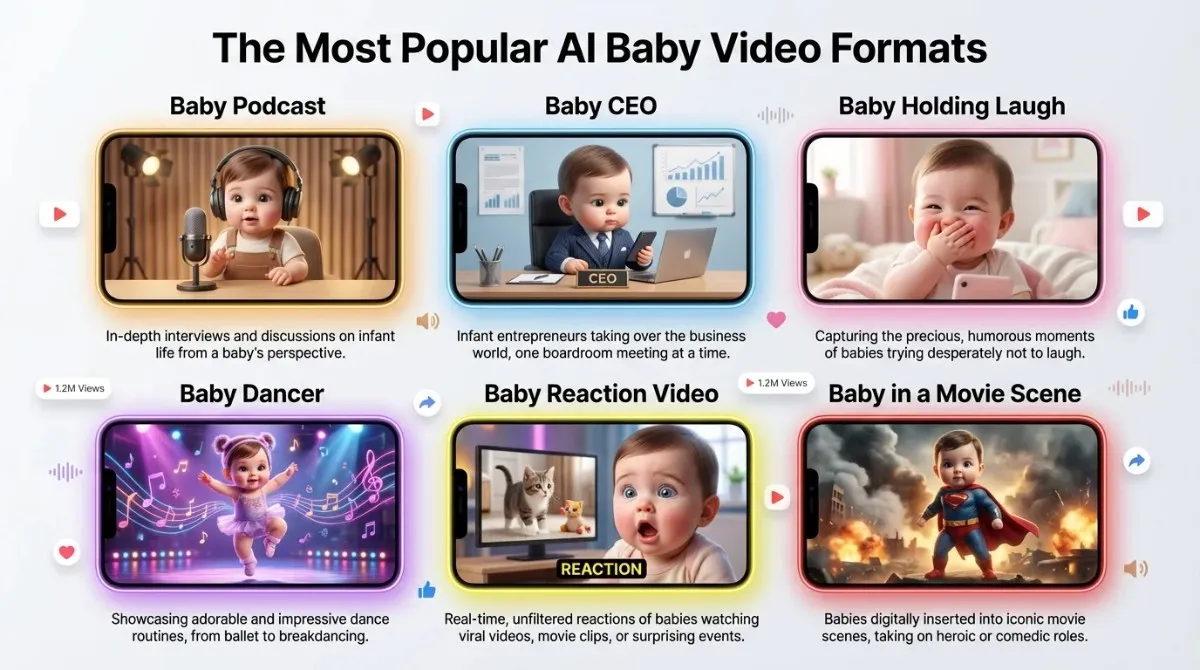
The Baby Podcast
A baby character sits behind a mic and delivers a monologue, usually comedic opinions or fake life advice. This format works because it mimics a familiar content format with an absurd twist.
The Baby CEO
Baby in business attire making corporate decisions. “Baby fires entire department.” “Baby explains Q3 results.” The contrast between innocence and authority is instantly funny.
The Baby Holding Laugh
One of the most-remixed formats. Based on a viral clip of an AI baby covering its mouth while trying not to laugh. Creators remix it with different filters, music, and expressions.
The Baby Dancer
A baby character performs trending choreography. The gap between the baby’s small body and the confident dance moves creates the humor. This format syncs easily to trending audio.
The Baby Reaction Video
The AI baby watches or reacts to something. Usually edited to simulate genuine shock, joy, or disgust. Works because reaction content is universally relatable.
The Baby in a Movie Scene
The AI baby is edited into an iconic film moment. The baby replaces the main character—the more unexpected the pairing, the better the engagement.
Ethical Guidelines for AI Baby Video Creators
This section is missing from almost every other guide on this topic. It matters.
Do not present AI baby videos as real.
Always disclose when content is AI-generated. TikTok requires it. Instagram is moving toward it. More importantly, it protects your credibility.
Do not use a real child’s photo without consent
If you are a parent posting your own child’s photo, that is your decision. But using other people’s children, including public figures’ children, without permission is not acceptable.
Do not create misleading content
Do not make an AI baby video appear to show a real event that did not happen. AI baby content is for entertainment. Misrepresentation damages trust.
Understand platform policies
Each platform has evolving rules on AI-generated content. Review TikTok’s AI content disclosure policy, Meta’s synthetic media rules, and YouTube’s AI content guidelines before posting.
Check your tool’s data policy.
When uploading a real baby photo, you are submitting it to a third-party AI platform. Read the privacy policy. Understand how the image is stored and whether it is used for model training.
Common Mistakes That Kill AI Baby Video Performance
The video is too long. AI baby videos’ content lives or dies on the loop. Keep videos under 20 seconds whenever possible.
- The concept is unclear: If someone watches your video and cannot explain the joke in one sentence, it is not clear enough. Simplify.
- The audio is of low quality: Audio quality matters more than video quality on TikTok and Reels. Use a clean, high-quality audio source.
- The face animation looks unnatural: This usually happens when the source image is low-quality, poorly lit, or partially obscured. Start with a better photo.
- No hook in the first second: The first second must give the viewer a reason to stay. Start mid-action. Do not open with a slow fade or a title card.
- Ignoring captions: Captions increase watch time by 40% on average across short-form platforms. Always add them.
Conclusion
AI baby videos are not a passing trend. The core format, innocent face, adult behavior, absurd contrast, works across every era of internet humor. The tools making it accessible are only improving. If you are a content creator, the window to build an audience with this format is still open. The tools are free. The workflow takes less than 30 minutes to learn. Start with one concept. Pick one tool. Make one video. Then iterate.
Frequently Asked Questions (FAQs)
What app do people use to make talking baby videos?
The most commonly used tools for lip-sync are Hedra, Dreamina, and Revid.ai. ImagineArt and CapCut Web are popular for full-production workflows.
Is Dreamina better than Hedra for AI lip-syncing?
Hedra tends to produce more natural facial expressions. Dreamina offers more built-in templates and is slightly easier for beginners. Both are strong options worth testing.
Can I make AI baby videos for free?
Yes. Hedra, ImagineArt, a1.art, CapCut Web, and FlexClip all offer free tiers or daily credits. Limitations vary, but most allow you to create and export videos without paying.
Do I need video editing experience?
No. Every tool mentioned in this guide is designed for beginners. If you can upload a file and click a button, you can make an AI baby video.
Are AI baby videos legal to post?
Generally, yes, as entertainment content. Always disclose AI generation as required by the platform. Avoid impersonating real people or misrepresenting AI content as genuine footage.
What makes an AI baby video go viral?
Short length. Strong contrast concept. Trending audio. Clear and fast hook. Captions. Early-hour engagement. These factors matter far more than production quality.
How do I make the baby’s face look realistic?
Use a high-quality, well-lit, front-facing source image. Generate using a photorealism-focused model like Leonardo AI’s Flux. Avoid cluttered backgrounds in the source photo.
What is the best prompt for generating an AI baby?
Use the formula: “Photorealistic baby [doing specific action], [setting], [lighting], [mood/expression], ultra-detailed, cinematic quality.” Be specific. Vague prompts produce vague results.






)
&description=&image=https://techwelo.com/wp-content/uploads/2026/04/ai-baby-videos-content-creation-workflow-social-media-1024x572.webp)