Every chatbot conversation is a data asset. Most businesses discard it. Each exchange, whether a product query at 2 a.m., a sales lead qualification, or an employee request, contains signals and intelligence that can drive business outcomes, but only if captured.
This guide covers everything you need to know about the AI chatbot conversations archive: what it is, why it matters, how to build one, and how to use it to optimize websites, integrate enterprise systems, power custom GPT chatbot solutions, manage Telegram bots at scale, and turn sales conversations into revenue intelligence.
What Is an AI Chatbot Conversations Archive?
An AI chatbot conversations archive is a searchable store of user-bot chats. It goes beyond simple logs by recording full session context messages, bot responses, timestamps, session metadata, intent, escalation events, and outcomes in a queryable, actionable format.
Think of it as your chatbot’s long-term memory. Most chatbots, even advanced ones, erase memory after each session. Without an archive, each conversation vanishes at the end, a missed opportunity and a competitive risk.
How Chatbot Conversation Archiving Works
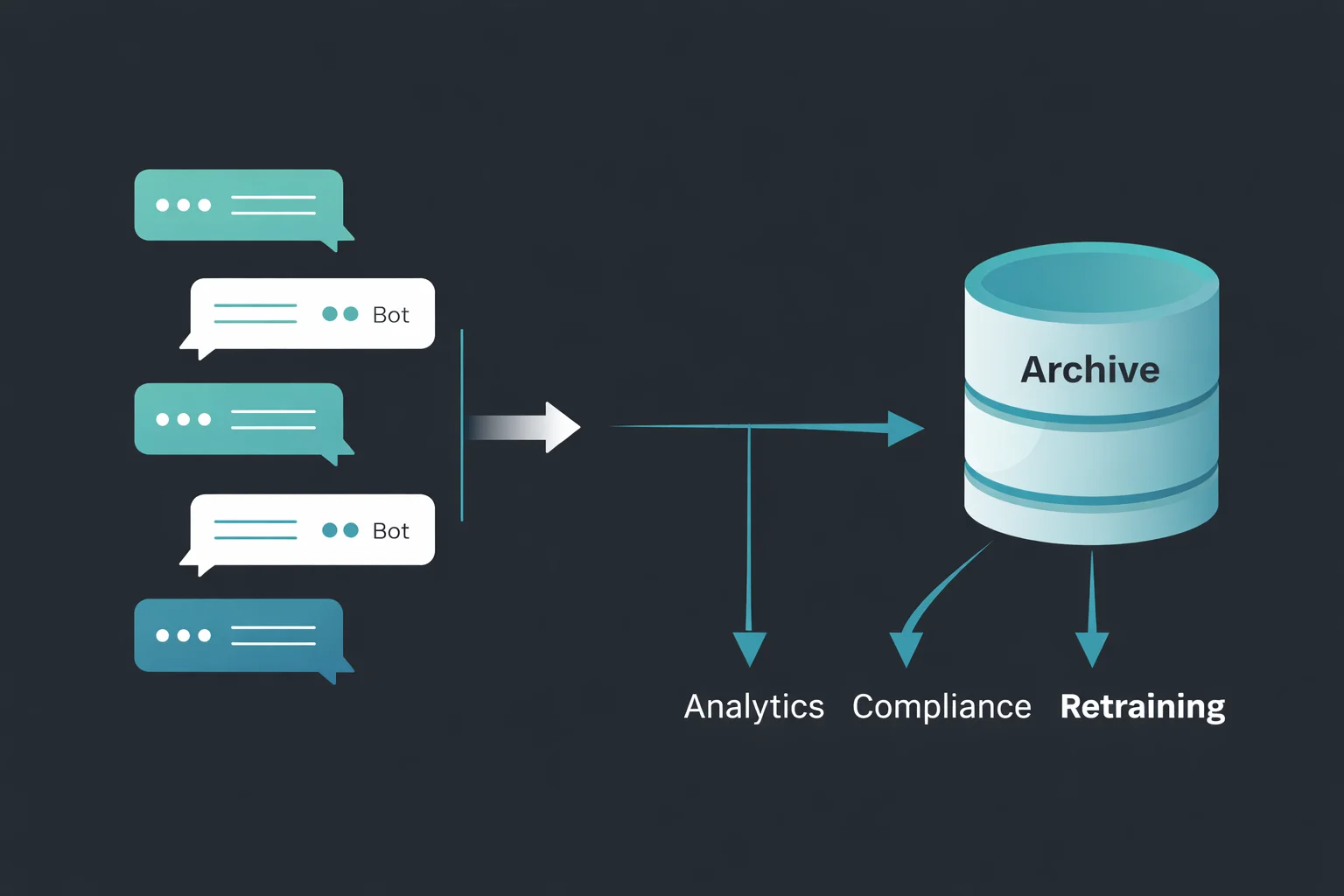
At a technical level, archiving works by intercepting the message exchange between the user and the bot and writing each turn of each human message and each AI tool response to a persistent data store. This can happen in real time (synchronous logging) or in batches after sessions close (asynchronous logging).
The data store can be a relational database, a document store such as MongoDB, a data warehouse such as BigQuery or Snowflake, or a dedicated conversation intelligence platform. What matters is that the data is structured consistently and indexed for fast retrieval. Each stored conversation typically includes:
- Session ID: a unique identifier linking all messages in a single interaction.
- User identifier: anonymized or authenticated, depending on your privacy model.
- Timestamps: message-level and session-level.
- Message content: the raw text (or structured data) of each turn.
- Intent labels: what the user was trying to accomplish.
- Entity extractions: names, dates, product references, and account numbers.
- Bot confidence scores: how certain the AI was about its responses.
- Escalation flags: whether the conversation was handed off to a human agent.
- Outcome data: did the user convert, resolve their issue, or abandon?
The Difference Between Session Memory and Persistent Archive
The distinction matters because session memory is about coherence within a conversation. Persistent archiving is about intelligence across conversations. These two concepts are often confused, and conflating them leads to poor architecture decisions.
Session Memory
Session memory is the in-context window a chatbot uses during an active conversation. It lets the bot remember what was said earlier in the same chat. Session memory is temporary. When the conversation ends, it’s gone.
Persistent Archive
A persistent conversation archive stores interactions permanently (or for a defined retention period) outside the model. It is accessible after the session ends, searchable across millions of conversations, and usable for analytics, retraining, compliance reporting, and personalization in future sessions.
What Data Gets Stored in a Chatbot Conversation Log
A rich archive stores not just messages but also metadata that enhances the value of the data: channel source, device data, entry points, and user journey context before and after chat. Additional insights, such as sentiment indicators (to detect frustration, satisfaction, or confusion), response latency, and fallback events (when the bot fails to answer), add even more depth. Altogether, this metadata transforms a simple conversation log into a powerful behavioral dataset that can be used to improve performance, user experience, and decision-making.
Real-Time vs. Asynchronous Archiving Explained
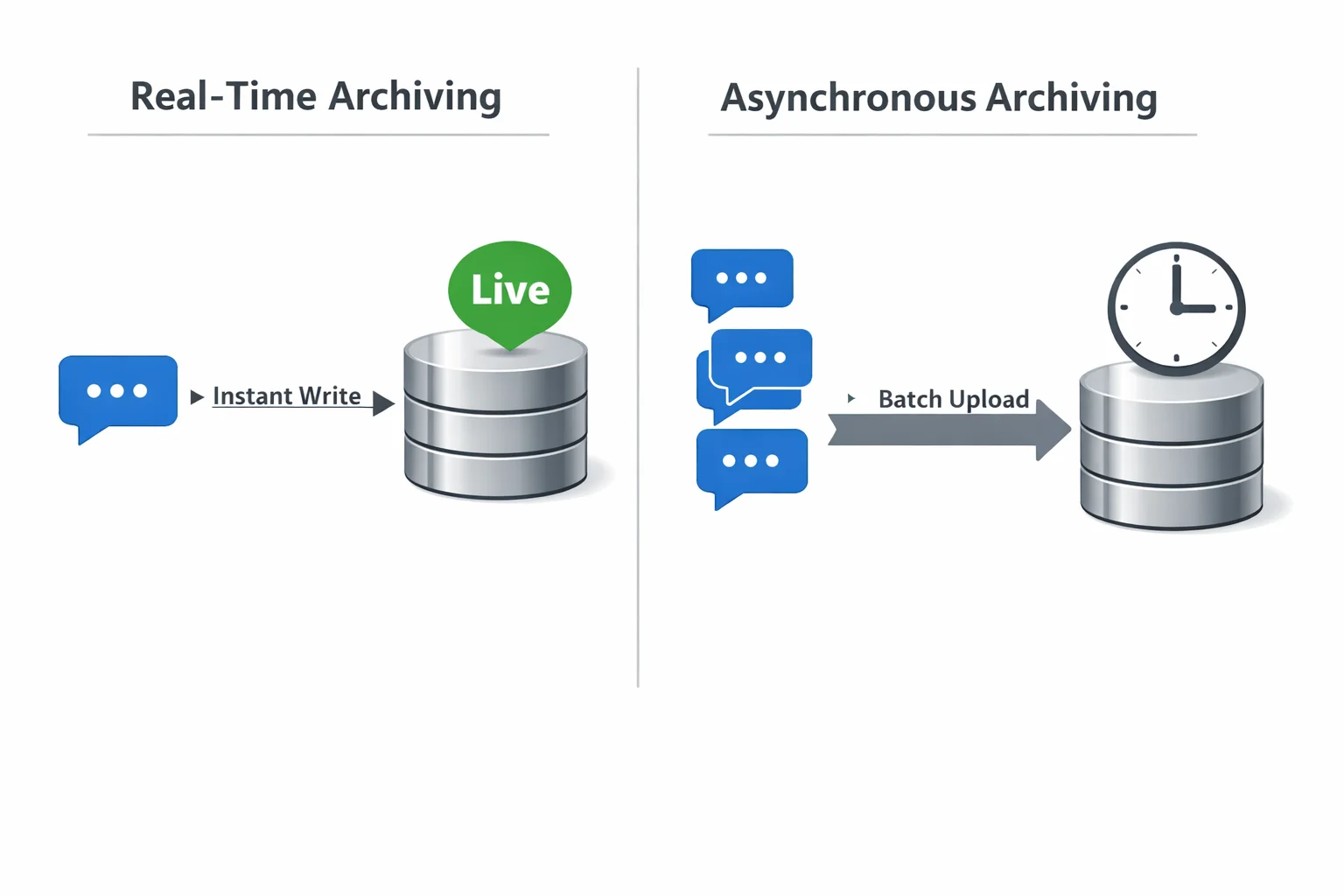
Many production systems use a hybrid approach: real-time streaming to a message queue (like Kafka or Pub/Sub), followed by batch processing from the queue into a structured archive. This gives you the benefits of both approaches.
Real-Time Archiving
Real-time archiving writes each message to storage the moment it’s sent or received. This is essential when you need live dashboards, instant alerting (for compliance violations or frustrated customers), or when conversations need to be reviewable while still in progress. The tradeoff is latency overhead and higher infrastructure cost.
Asynchronous Archiving
Asynchronous archiving batches messages and writes them to the archive after sessions end or on a schedule. It’s more efficient, puts less pressure on the chatbot response pipeline, and is appropriate for most analytics and compliance use cases where a slight delay is acceptable.
Why Archiving AI Chatbot Conversations Matters
Archiving isn’t a feature. It’s the foundation of any serious AI chatbot strategy. Here’s why.
Compliance, Audit Trails, and Data Governance
In regulated industries, such as financial services, healthcare, legal, insurance, and education, AI chatbot conversations may be subject to the same recordkeeping requirements as emails and phone calls.
In the United States, FINRA regulations require broker-dealers to retain records of electronic communications. In the EU, GDPR and sector-specific directives impose data-handling requirements, including the ability to produce records on request. Without an archive, you cannot:
- Demonstrate what your chatbot told a customer during a dispute.
- Produce records in response to a regulatory audit.
- Prove your AI was not providing misleading or harmful advice.
- Demonstrate that consent was properly obtained and communicated.
An AI chatbot conversation archive is your legal and operational safety net. Implement it before you need it, not after.
Training Better AI Models with Historical Conversation Data
The fastest way to improve an AI chatbot is to learn from its real conversations, and an archive provides the essential data for this process. It helps identify failure patterns, such as when the bot gives incorrect answers, falls back to generic responses, or causes users to abandon the interaction.
At the same time, it reveals new intents by highlighting questions the bot was not originally designed to handle. An archive provides data for training and fine-tuning, supports performance tracking, and enables data-driven improvements. Without it, AI development is guesswork.
Customer Experience Improvements from Conversation Replay
Conversation replay lets CX teams review entire chats, spot drop-off points, and see which questions cause confusion or are handled well. It also reveals how users express similar needs and what styles they prefer.
This is not just abstract insight but highly specific, actionable intelligence that can drive real improvements. By using these insights, teams can enhance customer experience, reduce resolution time, increase first-contact resolution rates, and lower the need for escalations.
How Archived Chats Reduce Support Costs Over Time
Every conversation that escalates to a human agent costs money. An AI chatbot is supposed to deflect those conversations. But without an archive, you can’t accurately measure deflection rates, identify which topics are causing unnecessary escalations, or systematically eliminate the gaps that send users to human agents.
Organizations that use conversation archives to continuously optimize their chatbots report significant reductions in escalation rates over 12–18 months. That translates directly into headcount efficiency and reduced support costs.
AI Chatbot Conversation Archive for Website Optimization
Your website chatbot is sitting on a goldmine of behavioral intelligence. Most companies mine none of it.
Using Chat Archives to Identify Conversion Bottlenecks
When a user visits your website and opens the chatbot, they’re telling you something. They had a question your website content didn’t answer. Or they needed reassurance before buying. Or they got confused at a specific point in the purchase flow.
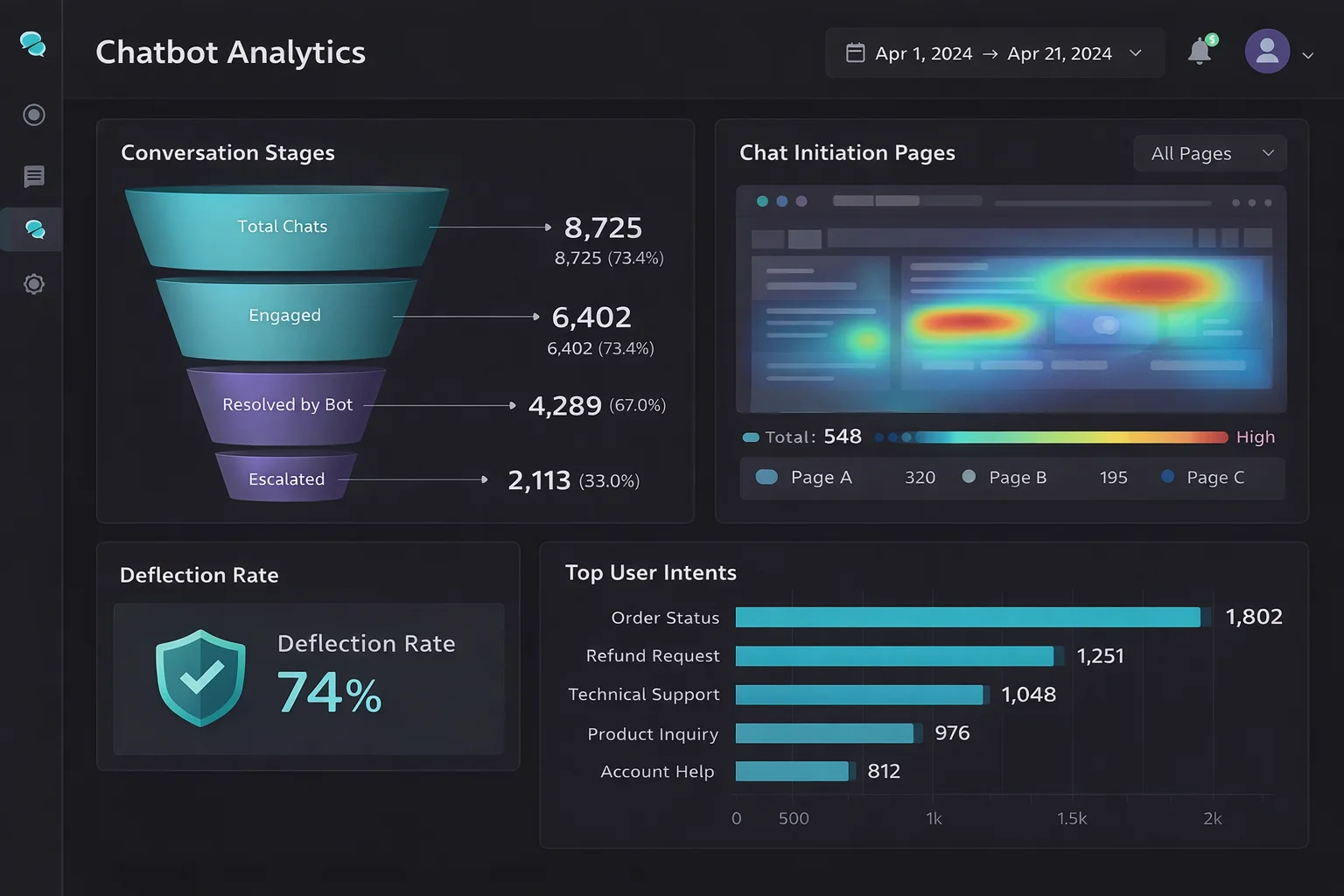
An AI chatbot conversation archive lets you map these moments precisely. By analyzing when conversations start (which page, which scroll depth, which action), what users ask, and what they do next, convert, abandon, or escalate, you can identify exactly where your website is failing to move users forward. Common findings from this type of analysis include:
- Pricing pages that generate the most chatbot activity, revealing unaddressed cost objections.
- Checkout flows where shipping or return policy questions spike content gaps that a simple FAQ block could eliminate.
- Product pages where users ask comparison questions that the page doesn’t answer, leading to decision paralysis.
Setting Measurable Chatbot Conversion Goals
Too many businesses deploy chatbots without clearly defining success, making it difficult to measure performance. An archive solves this problem by enabling accountability through meaningful conversion goals. These include metrics like deflection rate, which measures how many conversations are resolved without human involvement, and conversion assist rate, which tracks how often chatbot interactions lead to purchases or form completions.
It also includes time-to-resolution, sentiment improvement during conversations, and reduction in repeat queries from users. By archiving conversations, businesses can track these metrics over time and segment them based on user type, traffic source, device, or entry point. This enables the creation of a clear performance dashboard that not only improves decision-making but also makes chatbot ROI visible, measurable, and easy to justify.
How Archived Conversations Reveal User Intent at Scale
One conversation tells you one story. Ten thousand conversations tell you the story of your market. When you analyze an AI chatbot conversation archive at scale using NLP tools or an LLM-powered analytics layer, you start to see intent clusters, groups of related questions that reveal what your users are actually trying to accomplish, in their own words, without the filter of your marketing assumptions.
This is qualitative research on a quantitative scale. It’s more honest than surveys, more detailed than heatmaps, and more actionable than demographic data. It tells you what your customers want, not what you think they want.
Benefits of Chatbot Archiving for A/B Testing and UX Improvement
Chatbot conversation archives create a feedback loop for continuous UX improvement. When you test a new bot response template, conversation flow, or escalation threshold, the archive lets you compare outcomes before and after the change.
Did the new response to the shipping question reduce the number of follow-up messages? Did the updated checkout flow chatbot reduce cart abandonment? Did the revised escalation policy improve user satisfaction scores? Without an archive, these are unanswerable. With one, they become standard performance metrics.
ERP AI Chatbot Integration — Archiving Conversations Across Enterprise Systems
The ERP AI chatbot represents one of the most complex and high-value deployment environments for AI chatbot technology. And, in this context, conversation archiving has unique requirements.
What Is an ERP AI Chatbot and How Does It Use Conversation History?
An ERP AI chatbot is an AI assistant embedded in or connected to an enterprise resource planning (ERP) system, such as SAP, Oracle ERP Cloud, Microsoft Dynamics 365, or NetSuite. These chatbots help employees and sometimes customers navigate complex enterprise workflows, such as checking inventory levels, submitting procurement requests, retrieving financial reports, managing HR processes, or triggering workflows across business units.
In this context, conversation history isn’t just a log; it’s an operational record. When an employee asks the ERP chatbot to initiate a purchase order, that conversation is part of the transaction’s audit trail. When a manager requests a budget variance report via the chatbot interface, the archived conversation serves as evidence of who requested what, when, and what information was provided.
Syncing Chatbot Archives with CRM, ERP, and HRMS Platforms
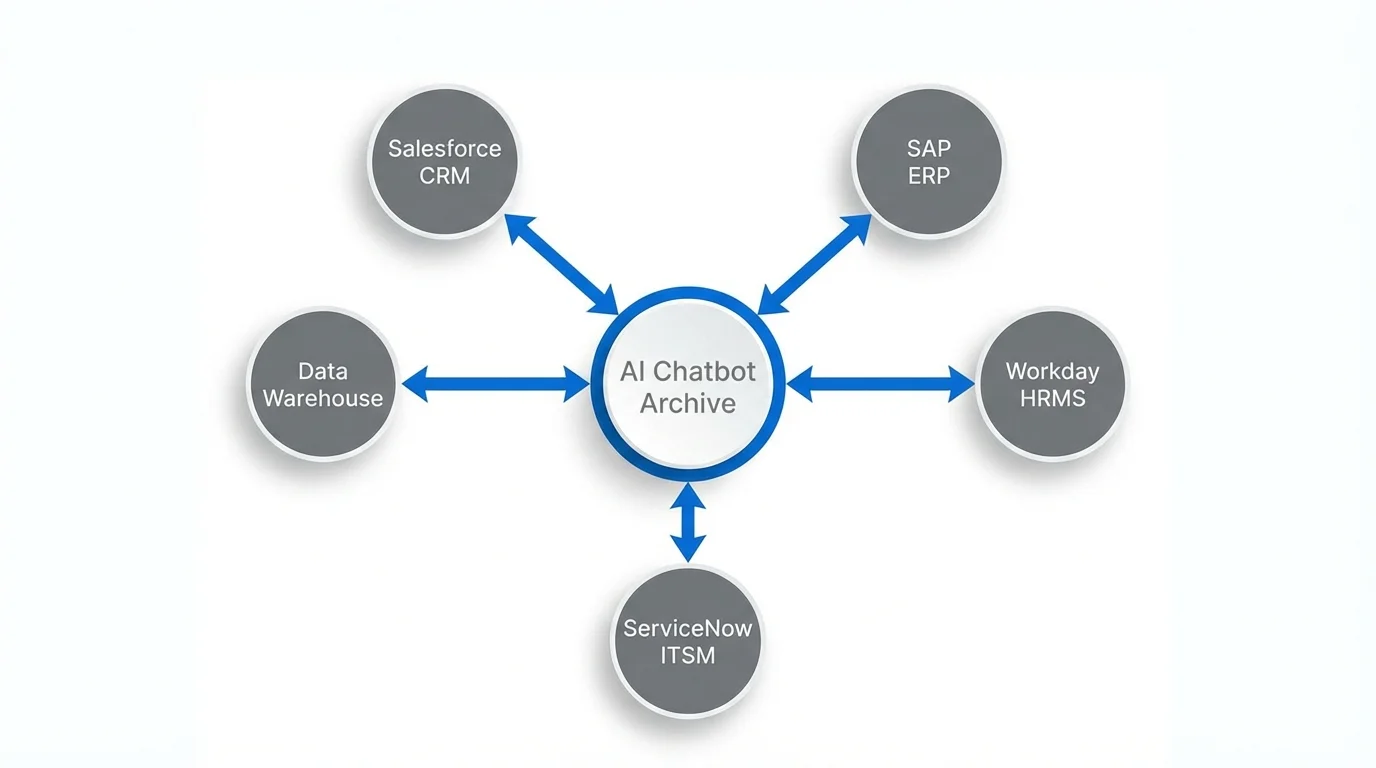
The strategic value of an ERP AI chatbot archive multiplies when it’s integrated with the surrounding enterprise data ecosystem. Rather than storing conversations in isolation, leading organizations sync chatbot archives with:
- CRM systems (Salesforce, HubSpot, Dynamics) — linking conversations to customer records, support tickets, and deal histories
- ERP platforms — associating chatbot interactions with specific transactions, workflows, or business objects
- HRMS platforms (Workday, SuccessFactors) — connecting HR chatbot conversations to employee records, onboarding workflows, and performance data
- ITSM tools (ServiceNow, Jira Service Management) — linking support conversations to incident and change management records
This integration transforms the chatbot archive from a standalone data silo into a connected layer of the enterprise data fabric.
Real-World ERP Chatbot Archiving Use Cases
Procurement
An AI chatbot handles vendor inquiry requests. Archived conversations let procurement teams review what information was provided to vendors, identify recurring questions that signal process gaps, and maintain compliance records for each procurement interaction.
IT Helpdesk
Employees report technical issues through an AI chatbot. The archive captures the full troubleshooting conversation, links it to the incident ticket, and provides future agents with context when the issue recurs.
Employee Onboarding
New hires use an AI chatbot to navigate their first day’s policy questions, system access requests, and benefits enrollment. The archive creates a complete record of each employee’s onboarding experience and flags where the process consistently creates confusion.
Finance
Employees use an AI chatbot to query financial data, request reports, or initiate approvals. Archived conversations support SOX compliance by creating auditable records of who accessed what financial information and when.
Best Practices for Enterprise-Grade Conversation Data Storage
Enterprise environments demand higher standards for conversation archiving:
Role-Based Access Control
Archive data should only be accessible to individuals with a legitimate business need. Proper access restrictions help prevent misuse or unauthorized exposure of sensitive information. Audit logs should also track who accessed what data to maintain accountability.
Encryption at Rest and in Transit
All conversation data must be securely encrypted both when stored and while being transmitted. Using standards like AES-256 ensures strong protection against data breaches. This safeguards sensitive information from unauthorized access at all stages.
Data Residency Compliance
For multinational organizations, conversation data must be stored in regions that comply with local laws. This ensures adherence to data sovereignty and privacy regulations. Proper data placement helps avoid legal risks and compliance issues.
Retention Policy Enforcement
Organizations should implement automated policies to delete conversations after a defined period. This helps manage storage efficiently and ensures compliance with data regulations. Legal hold capabilities should also be in place for cases like audits or litigation.
Integration with Enterprise Identity
Archived conversations should be linked to verified user identities through SSO or directory services. This eliminates reliance on anonymous session data and improves traceability. It also strengthens security and enhances data reliability for analysis.
Custom GPT AI Chatbot Solutions with Built-In Conversation Archiving
The explosion of custom GPT AI chatbot solutions has put sophisticated AI capabilities within reach of organizations of any size. But most custom GPT deployments are built without a robust archiving strategy, a gap that limits their long-term value.
How to Build a Custom GPT Chatbot That Stores Conversation History
Building a custom GPT chatbot with archiving requires decisions at three levels: the conversation layer, the storage layer, and the retrieval layer.
At the conversation layer, you need a mechanism to capture each turn of the conversation as it happens. If you’re building on the OpenAI API, this means logging the messages array that you pass to the API on each call, which already contains the conversation history up to that point, along with the model’s response.
At the storage layer, you need to decide where to store your conversations based on your scale and use case. Common options include managed database services such as PostgreSQL on RDS, Firestore, or Cosmos DB, which provide reliable and structured storage. You can also use purpose-built conversation analytics platforms like Botpress Analytics, Cognigy.AI Insights, or Rasa X for more specialized insights and management.
At the retrieval layer, you need tooling to query archived conversations: full-text search, metadata filters, date ranges, and semantic similarity search if you’ve indexed conversation embeddings.
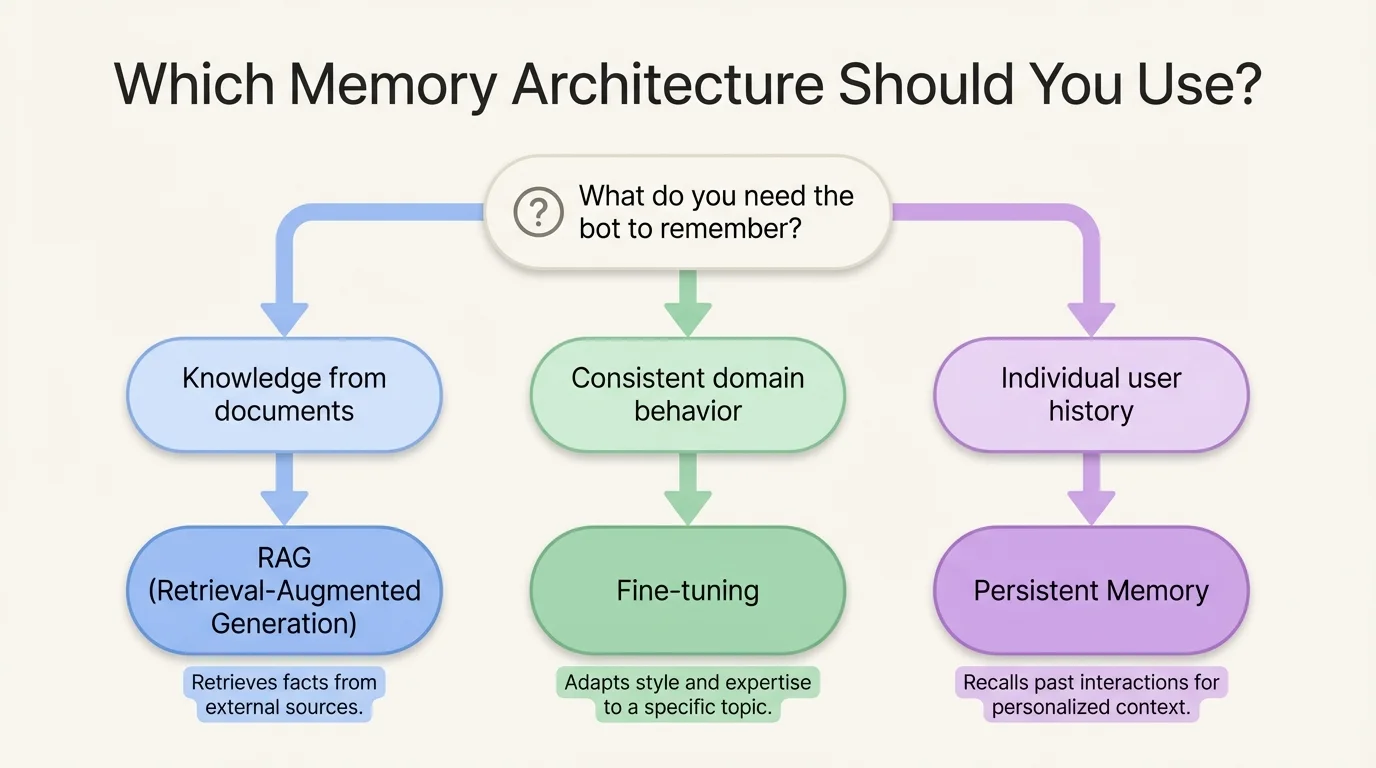
Choosing the Right Architecture: RAG, Fine-Tuning, or Persistent Memory
The most common question about custom GPT chatbot solutions is how to make the bot remember, and the answer depends on what kind of memory you need.
Retrieval-Augmented Generation
Retrieval-Augmented Generation (RAG) is the right choice when you want the bot to answer questions using information from a large, frequently updated knowledge base. The archive feeds into a vector store, and relevant archived conversations are retrieved and included in the context at query time. This is powerful for support bots that should learn from past resolutions.
Fine-Tuning
Fine-tuning is the right choice when you want to change how the model behaves, its tone, its domain expertise, and its response structure based on curated examples from your archive. Fine-tuning is more expensive and less flexible than RAG but produces more consistent, deeply specialized behavior.
Persistent Memory
Persistent memory (using tools like MemGPT or custom memory management layers) is the right choice when individual users should be recognized across sessions, and the bot should personalize based on their history. The archive stores per-user memory objects that are loaded into context at the start of each new conversation.
Many sophisticated custom GPT chatbot solutions combine all three: RAG for knowledge retrieval, fine-tuning for domain alignment, and persistent memory for personalization.
Custom GPT Conversation Archive Tools and APIs
Key tools for building conversation archiving into custom GPT solutions:
- LangChain — provides conversation memory classes and integrations with multiple storage backends.
- LlamaIndex — strong support for indexing conversation archives for RAG pipelines
- Flowise / LangFlow — visual builders for conversation flows with built-in logging
- Helicone / LangSmith / Braintrust — LLM observability platforms that automatically capture and archive API interactions
- PostHog / Mixpanel (with custom events) — product analytics tools that can be adapted to capture chatbot conversation events
Security and Privacy Considerations for Custom AI Chatbot Data
Conversation archives contain sensitive data, user questions, personal details, and business information. Security is non-negotiable. Key requirements:
PII Detection and Masking
Automatically identify and protect personally identifiable information before storing conversations. Sensitive data should be redacted or restricted to authorized access only. This reduces privacy risks and helps maintain regulatory compliance.
User Consent Management
Users should be clearly informed that their conversations may be stored or analyzed. Where required, proper consent must be obtained before collecting or processing data. This builds trust and ensures legal compliance.
Data Minimization
Only store the data that is truly necessary for your purpose. Avoid keeping full transcripts if summarized or aggregated data is sufficient. This approach reduces storage costs and limits exposure to sensitive information.
Third-Party Data Handling
If your system relies on external LLM APIs, carefully review their data policies. Understand how they use, store, or train on your data. This ensures your data remains secure and aligned with compliance standards.
Breach Response Planning
Have a clear plan in place in case your conversation archive is exposed. This should include steps for containment, investigation, and user notification. It must also align with legal obligations under regulations such as the GDPR, the CCPA, and other industry laws.
Telegram AI Chatbot — Managing and Archiving Conversations at Scale
Telegram AI chatbots occupy a unique position in the conversational AI landscape. Telegram’s open bot API, massive global user base, and rich feature set make it a favored platform for deploying AI chatbots across a remarkable range of use cases, from customer support to community management to content delivery. Archiving Telegram chatbot conversations involves its own considerations, tools, and best practices.
How Telegram Bots Store Conversation History
By default, Telegram does not provide bots with persistent conversation history through the API. When you call the Telegram Bot API’s getUpdates endpoint, you receive recent updates, but historical messages are not retrievable after a short window.
This means that Telegram AI chatbot developers are responsible for implementing their own archiving layer. Every update received from the Telegram Bot API must be written to an external store if you want to retain it.
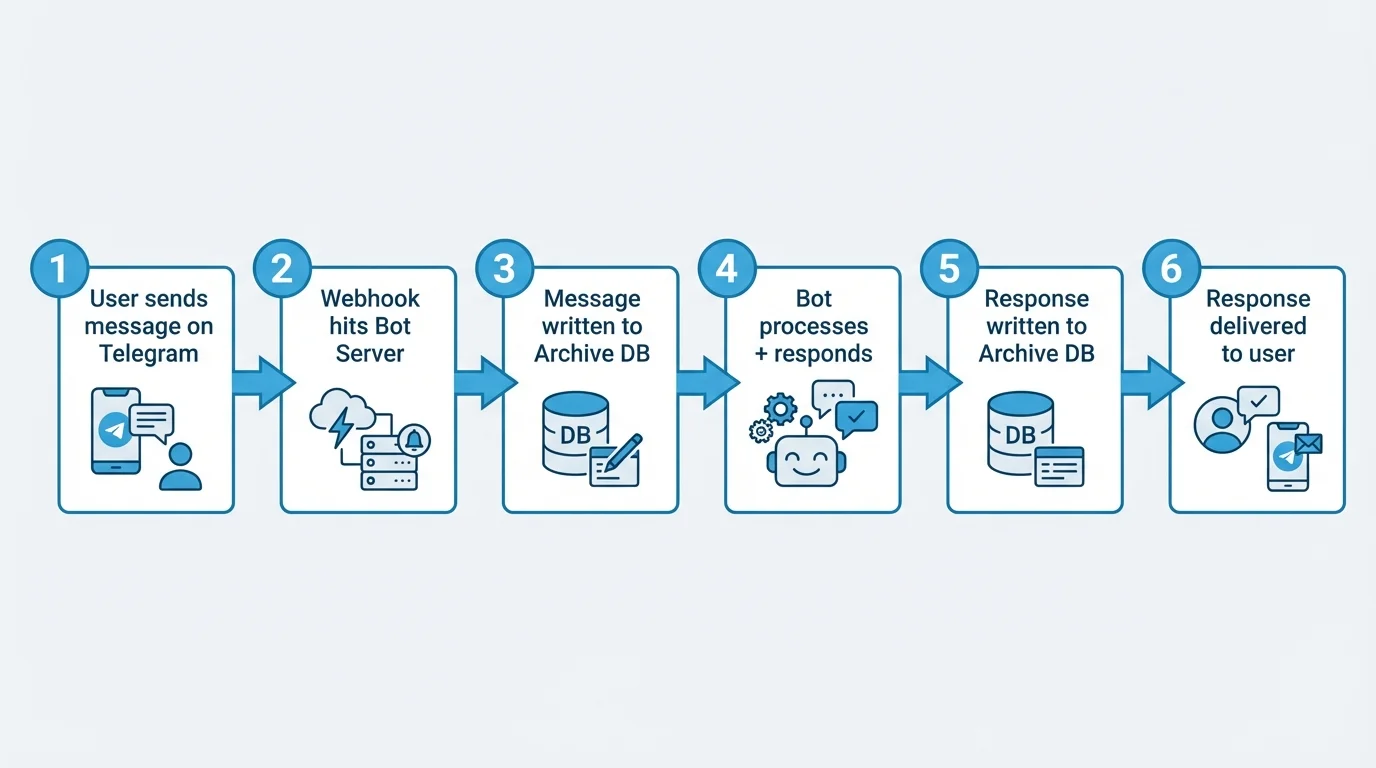
A typical Telegram chatbot architecture follows a structured flow to ensure both functionality and proper data capture. First, your bot server receives updates via a webhook or long polling, and before processing them, the raw message object is stored in your archive system. The bot then processes the update, generates an appropriate response, and saves it to the archive.
Finally, the response is sent back to Telegram, completing the interaction cycle. This two-step capture of both the incoming message and outgoing response ensures a complete and accurate record of every conversation turn, which is essential for analysis, improvement, and compliance.
Tools to Export and Archive Telegram Chatbot Conversations
Several tools and frameworks support Telegram chatbot conversation archiving:
- Python-telegram-bot — the most widely used Telegram bot framework, easily extended with middleware to log all incoming and outgoing messages.
- Telegraf (Node.js) — a popular JavaScript framework with middleware support for conversation logging.
- Telethon — a Python client library that can operate user accounts (not just bots), enabling the retrieval of historical messages from channels and groups.
- Telegrambot-database libraries — community-built wrappers that abstract database storage for conversation state and history.
For storage backends, Redis is commonly used for active session state, while PostgreSQL or MongoDB is used for persistent archives.
Using Telegram Chatbot Archives for Analytics and Retraining
Once archived, Telegram chatbot conversation data is valuable in the same ways as any other chatbot archive, but with some Telegram-specific opportunities:
Channel and Group Analytics
If your bot operates in group chats, archived conversations reveal community dynamics, frequently asked questions, and moderation needs at scale.
Broadcast vs. Conversation Segmentation
Telegram bots often serve both broadcast (one-to-many message delivery) and interactive (back-and-forth conversation) functions; archives help you measure and optimize both.
Multi-Language Analysis
Telegram’s global user base often means conversations in multiple languages; an archive enables language-segmented analysis and localized bot improvement.
Setting Up a Telegram AI Chatbot with Long-Term Memory
Long-term memory in a Telegram AI chatbot allows the system to recognize returning users and deliver personalized responses based on past interactions. This is achieved by mapping Telegram user IDs to stored user records, retrieving relevant historical context at the start of each conversation, and feeding that context into the system either through LLM prompts or intent classification logic.
As conversations continue, the bot updates each user’s memory with new preferences, behaviors, and important details. By implementing this approach, a stateless chatbot becomes a persistent, personalized AI assistant. This not only improves user experience but also provides a strong competitive advantage by increasing user retention and overall satisfaction.
AI Sales Chatbot Conversation Archives: Turning Chat Data into Revenue
For AI sales chatbots, including distro-style systems that route and qualify inbound leads, the conversation archive is not just an operational tool. It is a revenue intelligence asset.
How Sales Chatbots Use Archived Conversations to Qualify Leads
A sales AI chatbot typically engages inbound visitors in real-time conversations designed to qualify interest, capture contact information, and route prospects to the right next step: a sales rep, a demo booking, or a product page.
Every one of these conversations contains a qualification signal: what the prospect cares about, what objections they raised, what product features they asked about, what their timeline and budget context suggests. The archive captures all of this in structured form.
When this data flows into your CRM and is linked to the contact record created during the conversation, sales reps arrive at their first human interaction already knowing what the prospect asked, what resonated, and where hesitation occurred. That’s a material improvement in the quality and efficiency of the sales process.
Distro-Style AI Sales Chatbot Conversation Routing and Logging
A distro AI sales chatbot model focuses on intelligent routing, where conversations are used to determine the most suitable sales team, representative, or resource for each prospect, then smoothly hand them off. In this approach, archiving is critical because routing decisions must be fully auditable, enabling teams to review past conversations and understand why a prospect may have been routed incorrectly. This allows the routing logic to be refined and improved over time.
Additionally, effective handoffs depend on transferring the complete context, ensuring the receiving sales representative has a full conversation summary rather than just basic details such as a name or email. Archiving also enables accurate attribution analysis by linking conversation data with deal outcomes, helping identify which routing strategies deliver the best results. Ultimately, the conversation archive serves as the foundation for making distro-style routing both measurable and continuously improvable.
Analyzing Archived Sales Chat Data for Pipeline Insights
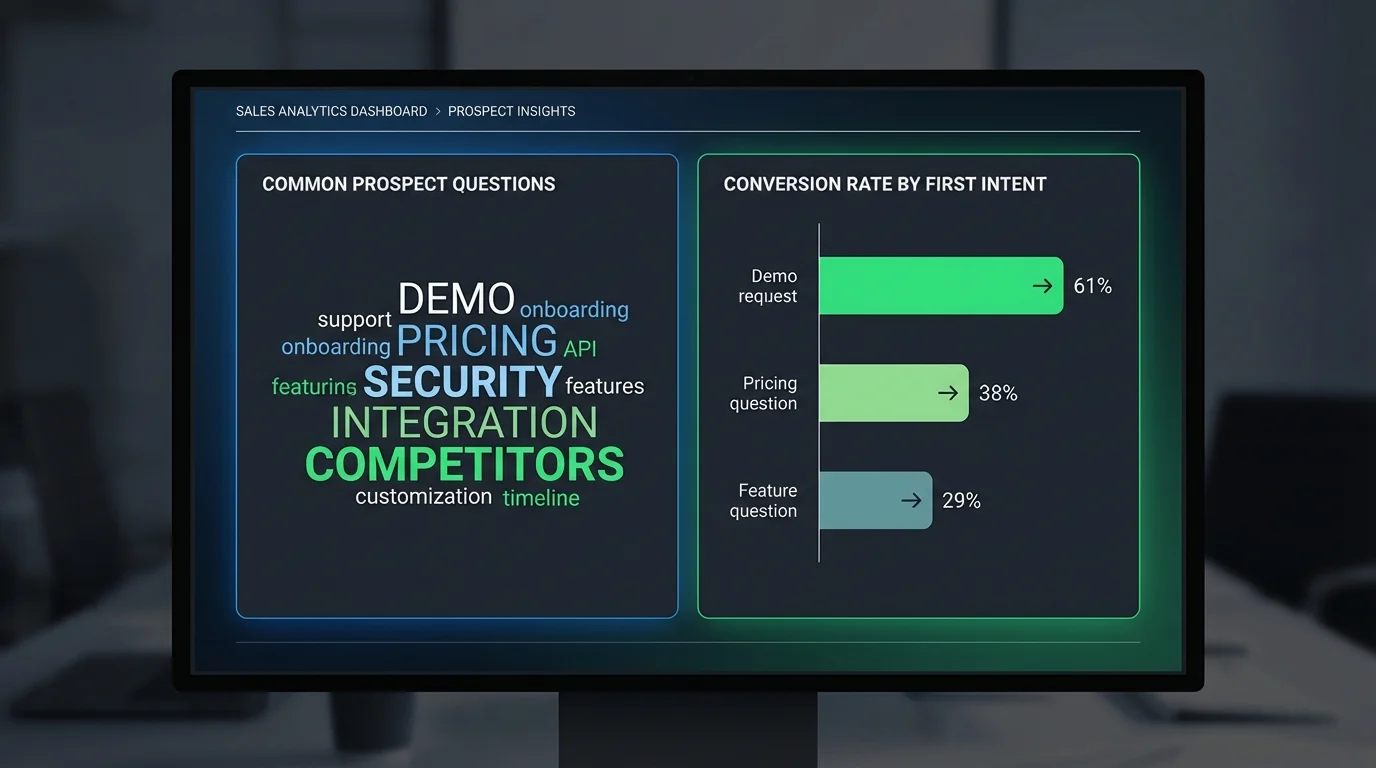
At scale, a sales chatbot conversation archive serves as a powerful strategic intelligence tool. By analyzing these archived conversations, businesses can uncover common objections across segments: enterprise prospects focus on security, while SMBs focus on pricing. It also highlights high-intent signals, identifying questions or phrases that correlate with higher conversion rates, triggering immediate alerts or faster routing to sales reps.
Additionally, the archive captures competitor mentions, revealing which competitors are referenced and in what context, and identifies product feature demand by tracking inquiries about features not yet offered. Seasonal patterns can also be detected, showing how conversation volume and topic focus shift over time, aiding proactive capacity planning. This process generates continuous, automated market research without surveys or sampling, eliminating bias and providing real-time insights.
Integrating Sales Chatbot Archives with Your CRM
The integration between your sales chatbot archive and your CRM is the most critical technical connection in your AI sales infrastructure. Best practices for this integration include automatically creating or updating CRM records when a prospect provides identifying information, ensuring that each conversation is captured in a structured summary on the corresponding contact or lead record. If the chatbot calculates a lead qualification score during the conversation, this score should be synced to the CRM’s lead scoring field.
Additionally, every chatbot interaction should be logged as an activity on the contact timeline, alongside emails, calls, and meetings. Conversations that meet defined criteria, such as a prospect confirming a specific budget, can trigger the automatic creation and assignment of a deal to the appropriate sales representative. CRMs that support this level of integration through native connectors or webhook APIs include Salesforce, HubSpot, Pipedrive, and Zoho CRM.
How to Archive AI Chatbot Conversations
Building a production-grade AI chatbot conversation archive is a straightforward engineering project if approached methodically.
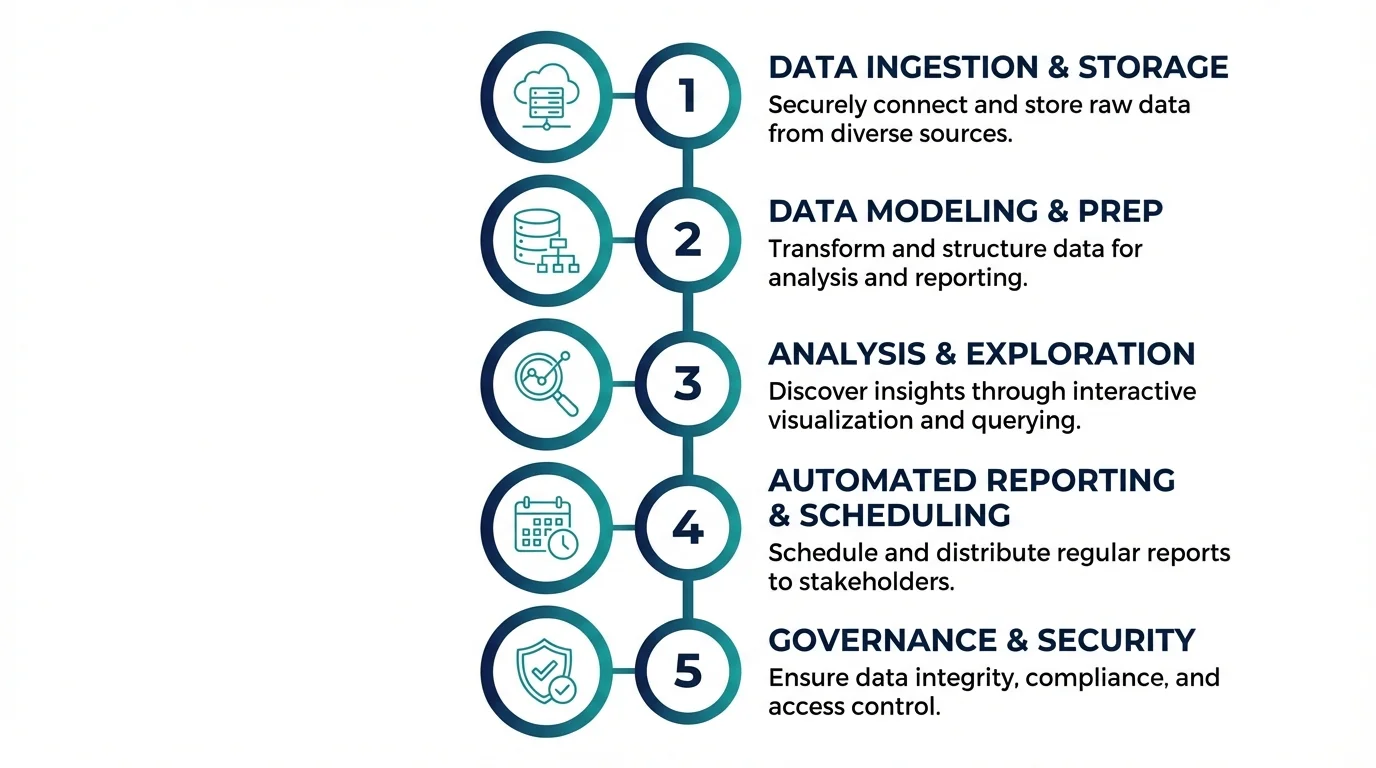
Step 1 — Choose Your Storage Method
Your three primary options are:
Cloud-managed databases (PostgreSQL on AWS RDS, Firestore, MongoDB Atlas) are the right choice for most organizations. Managed services reduce operational overhead, provide automated backups, and scale without intervention. PostgreSQL is a strong default: it handles structured conversation metadata well, supports JSON for flexible message content storage, and has excellent tooling for analytics queries.
On-premises storage is appropriate when data sovereignty, security policies, or regulatory requirements mandate that data remain within your own infrastructure. Higher operational overhead but maximum control.
Hybrid: sensitive metadata stays on-premises, and anonymized or aggregated analytics data flows to a cloud data warehouse for large-scale analysis.
Step 2 — Define Your Data Schema for Conversation Logs
Design for the analysis you want to do in six months, not just the logging you need today. Schema design determines what analysis is possible later. Invest time here. A solid base schema for a conversation archive includes:
- conversation_id (UUID, primary key)
- session_start_timestamp / session_end_timestamp
- channel (web, telegram, ERP, mobile, api)
- user_id (anonymized or authenticated)
- messages (JSON array — each object contains role, content, timestamp, confidence_score)
- intent_path (array of detected intents across the conversation)
- escalated (boolean)
- escalation_reason (string, if applicable)
- outcome (converted, abandoned, resolved, escalated)
- entry_page (for web channels)
- bot_version (to enable pre/post-update comparisons)
Step 3 — Implement Retrieval and Search Across Archives
Storage without retrieval is essentially a write-only black box, so your archive must be designed for easy access and analysis. It should support full-text search to locate conversations containing specific words or phrases, using tools like Elasticsearch, PostgreSQL full-text search, or Typesense. Metadata filtering is also essential, allowing queries by date range, channel, outcome, user segment, or any structured field.
For deeper insights, semantic search enables finding conversations that are topically similar even when phrased differently, which requires embedding each conversation and storing vectors in a vector database. Aggregation queries further enhance analysis by counting conversations by intent, calculating average resolution times, and measuring escalation rates over time. To make this accessible, build an internal tooling interface, even a simple one, so non-technical team members, such as CX managers, sales leaders, or compliance officers, can query the archive without needing SQL knowledge.
Step 4 — Set Retention Policies and Deletion Schedules
Not all conversation data should be stored indefinitely, so it’s important to define a clear retention policy. This includes setting a standard retention period, typically 12–24 months for operational use, with longer durations for industries driven by compliance requirements. A legal hold process should be in place to flag specific conversations for indefinite retention during active litigation or regulatory investigations.
Automated deletion mechanisms should run scheduled jobs to permanently remove conversations and associated metadata once they have passed their retention date. Additionally, there must be a process to handle user deletion requests, ensuring compliance with GDPR Article 17 by locating and deleting all archived data linked to a specific user. The retention policy should be formally documented and reviewed annually by legal and compliance stakeholders.
Step 5 — Monitor and Audit Your Conversation Archive
The archive requires continuous operational oversight to ensure reliability and compliance. This includes monitoring storage growth and triggering alerts if consumption exceeds projections, as well as tracking ingestion lag to detect when messages take longer than expected to reach the archive. Access audit logging is essential, recording every query and retrieval, who performed it, and what data was accessed.
Regular data quality checks should run to identify malformed records, missing fields, or encoding errors. Additionally, retention compliance reporting should be automated to ensure deletion schedules are executed as planned, maintaining both operational integrity and regulatory compliance.
Top Tools for AI Chatbot Conversation Archiving
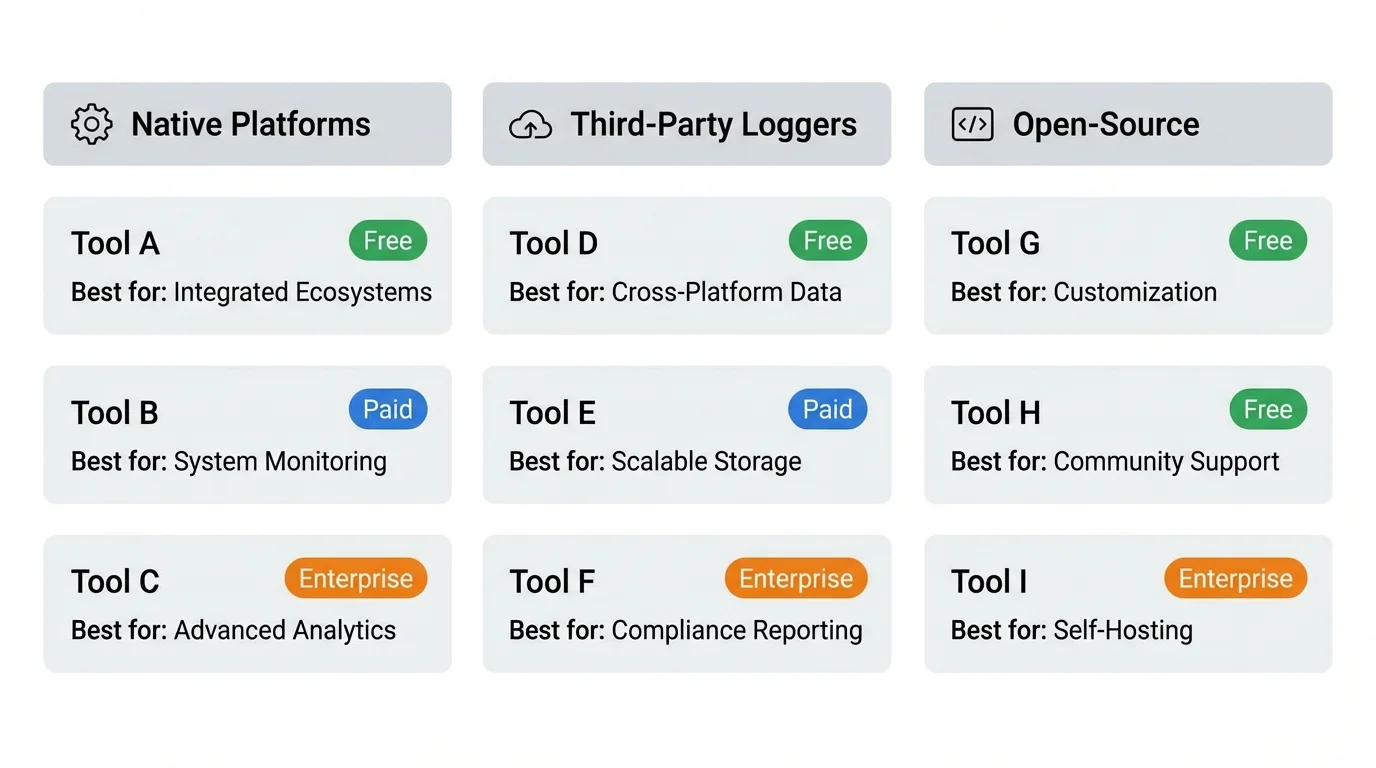
Native Platform Archiving
ChatGPT / OpenAI API
By default, the API does not retain conversation history on the server side, so archiving is the responsibility of the API consumer. While the ChatGPT consumer interface keeps conversation history within your account, this data is not accessible for programmatic analysis, meaning you cannot automatically query or analyze it without building your own storage solution.
Claude / Anthropic API
Like OpenAI, Anthropic’s API does not retain conversations by default for training unless users explicitly opt in. To preserve and analyze conversation data, you need to implement your own archive layer that securely stores all interactions for operational or analytical use.
Google Gemini API
Like the Gemini API, the Google Gemini API does not maintain conversation history by default. For production deployments, it is essential to implement an independent archiving system to capture, manage, and analyze conversation data in line with your business needs.
Third-Party Conversation Logging Solutions
Helicone
Helicone is a lightweight LLM proxy that logs all API calls, provides cost tracking, latency analytics, and conversation replay. It is designed for easy integration, making it simple to drop into existing OpenAI or Anthropic setups without major modifications.
LangSmith
LangSmith offers full observability for LLM applications, including detailed conversation tracing, evaluation, and dataset management. Its system is built from archived conversations, giving developers insights to improve model performance and track user interactions effectively.
Braintrust
Braintrust is an evaluation and logging platform that excels at building test sets from production conversations. It provides robust tools for assessing model behavior and tracking performance across real-world interactions.
Botpress Analytics
Botpress Analytics delivers native conversation analytics for chatbots built on the Botpress platform. It includes features such as funnel analysis, intent distribution, and fallback reporting to help teams understand how users interact with their bots.
Cognigy.AI Insights
Cognigy.AI Insights is an enterprise-grade conversation analytics platform designed for Cognigy-deployed chatbots. It provides advanced reporting and analysis tools to monitor chatbot performance and optimize user engagement at scale.
Open-Source Chatbot Archive Frameworks
Rasa X / Rasa Pro
Rasa X and Rasa Pro provide comprehensive tools for conversation review, annotation, and dataset management. These platforms are specifically designed for Rasa-based chatbots, helping developers improve model accuracy and maintain high-quality interactions.
Botkit
Botkit is an extensible Node.js framework that includes built-in support for conversation logging middleware. This allows developers to easily capture and analyze chatbot interactions while leveraging Botkit’s flexible architecture for custom integrations.
Chatterbot (Python)
Chatterbot is a Python-based chatbot framework that includes built-in SQLite conversation logging. It is well-suited for lightweight deployments, providing a simple way to store and review conversations without complex infrastructure.
Comparing Tools by Platform, Cost, and Compliance Readiness
| Tool | Best For | Cost Model | Compliance Features |
| Helicone | OpenAI/Anthropic API users | Free tier + usage-based | SOC 2 (check current status) |
| LangSmith | LangChain-based apps | Free tier + team plans | Data residency options |
| Botpress Analytics | Botpress deployments | Included with Botpress | GDPR controls |
| Cognigy.AI Insights | Enterprise deployments | Enterprise contract | GDPR, ISO 27001 |
| Custom PostgreSQL | Any platform | Infrastructure cost | Full control |
 Final Thoughts
 Final Thoughts
An AI chatbot is only as intelligent as the data ecosystem around it. The conversations your chatbot has every day are your most honest, current, and granular source of intelligence about your customers, employees, products, and processes. An AI chatbot conversations archive is the infrastructure that converts those conversations from ephemeral exchanges into durable, compound-value data assets.
Whether you’re optimizing a website chatbot for conversion, integrating an ERP AI chatbot across enterprise workflows, building custom GPT AI chatbot solutions with memory and personalization, managing a Telegram AI chatbot at scale, or analyzing distro AI sales chatbot conversations for revenue intelligence, the archive is what makes the investment worthwhile. Start with a simple schema.
Write every message. Instrument for retrieval from day one. Then build from there. The organizations that treat their chatbot conversation archives as strategic assets, not infrastructure footnotes, will compound the value of their AI investments in ways that chatbot-as-a-feature deployments simply cannot match.
Frequently Asked Questions (FAQs)
How Long Should You Retain AI Chatbot Conversation Logs?
The right retention period depends on your use case and regulatory environment. For general operational analytics and model improvement, 12–24 months is sufficiently long to capture seasonal patterns and year-over-year comparisons while limiting liability exposure. For compliance-driven use cases in financial services or healthcare, retention requirements may extend to 3–7 years depending on applicable regulations. Always consult legal counsel for your specific industry and jurisdiction.
Are Archived AI Chatbot Conversations GDPR Compliant?
They can be, but compliance is not automatic. GDPR compliance for conversation archives requires a lawful basis for processing (typically legitimate interest or consent), transparent disclosure to users that conversations may be stored, data minimization (only storing what is necessary), enforced retention limits with automated deletion, a mechanism to honor individual deletion requests, and a data processing agreement with any third-party vendors who process the archived data. GDPR compliance is a design requirement, not an afterthought.
Can Archived Conversations Be Used to Retrain AI Models?
Yes, and this is one of the highest-value uses of a conversation archive. However, there are important conditions. You must have the appropriate rights to use the data for this purpose, which may require explicit user consent beyond what is needed for operational archiving. You must also implement quality control to ensure you’re fine-tuning on high-quality, correct conversations rather than reinforcing the model’s existing errors. Always curate and review fine-tuning datasets drawn from archives rather than using raw logs directly.
What’s the Difference Between Chat History and a Full Conversation Archive?
“Chat history” typically refers to the in-product interface that displays a user’s past conversations, such as the left sidebar in ChatGPT. This is user-facing and user-accessible. A “full conversation archive” is a back-end data store that captures all conversations across all users, structured for analysis, compliance, and model improvement. The two may draw from the same underlying data, but they serve fundamentally different purposes and audiences.
How Do You Search and Retrieve Specific Conversations from an Archive?
Effective retrieval from a conversation archive depends on your indexing strategy. For known-criteria retrieval (e.g., finding all conversations from a specific user or all conversations where escalation occurred last week), standard database queries on indexed fields are fast and sufficient. For topical retrieval (e.g., finding all conversations where users asked about return policies), either full-text search or semantic vector search is required. For regulatory retrieval (produce all conversations involving a specific customer in response to a legal hold), you need a combination of metadata filters to narrow the candidate set and full-text search to confirm relevance. Build your retrieval tooling to support all three patterns.