Creating an immersive gaming environment extends far beyond owning a powerful PC or the latest console. The difference between a mediocre gaming session and an extraordinary one often lies in the carefully selected accessories that support, enhance, and optimize your entire setup. While your primary hardware handles the processing power, the accessories you choose determine comfort, performance consistency, and overall gaming satisfaction during those marathon sessions that can stretch well into the night.
The gaming accessories market has evolved dramatically over the past decade. What once consisted of basic peripherals has transformed into a sophisticated ecosystem of specialized equipment designed to address every aspect of the gaming experience. From ergonomic solutions that prevent physical strain to ambient lighting that creates atmosphere, each accessory serves a specific purpose in building a comprehensive gaming environment. Understanding which accessories genuinely enhance your setup versus those that merely add clutter requires knowledge, experience, and a clear understanding of your personal gaming needs.
This guide explores the essential and optional accessories that can transform your gaming space from functional to exceptional. Whether you’re building your first dedicated gaming area or refining an existing setup, the insights shared here will help you make informed decisions about where to invest your money for maximum impact on both performance and enjoyment.

Essential Peripherals That Define Your Gaming Setup Accessories
The foundation of any serious gaming setup begins with peripherals that directly interface with your games. These aren’t optional add-ons; they’re the primary tools you use to interact with virtual worlds, and their quality directly affects your performance and comfort.
Gaming Mice
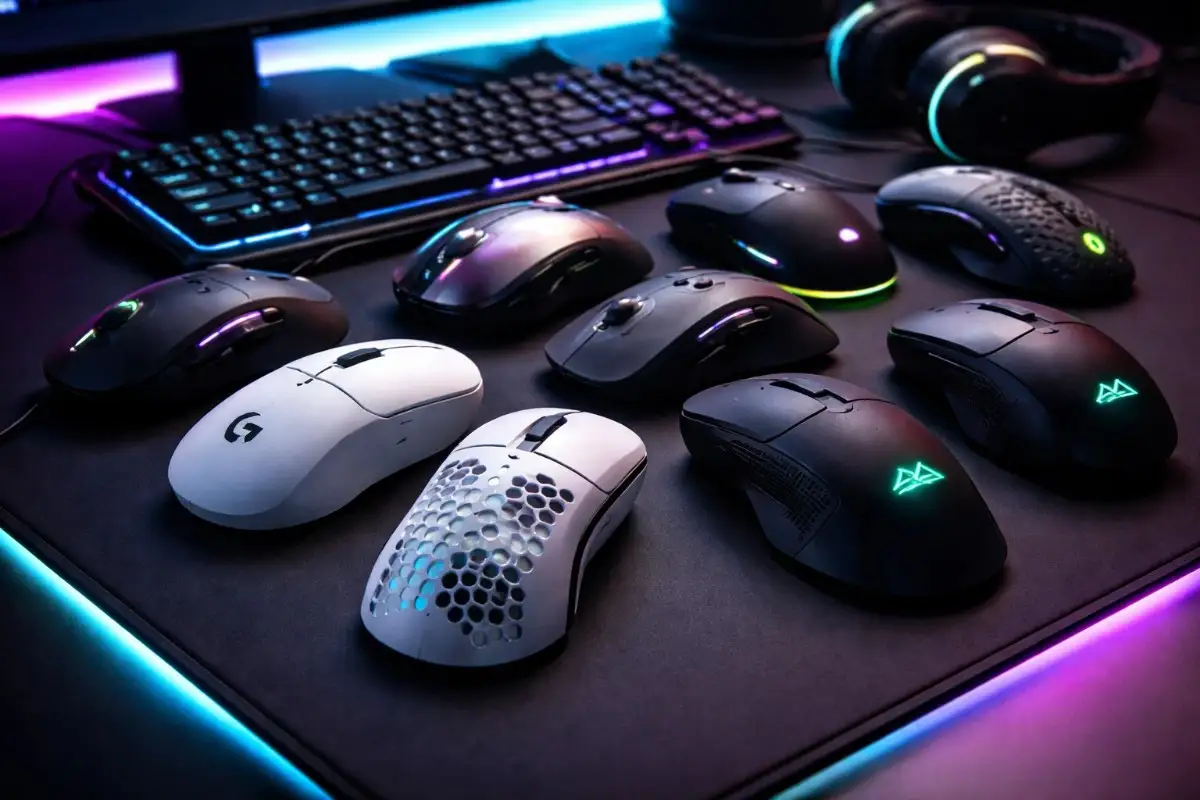
One of the most important accessories is a gaming mice, which represents one of the most critical investments you’ll make. Unlike standard office mice, gaming-specific models offer adjustable DPI settings ranging from 400 to 20,000 or higher, allowing pixel-perfect precision for sniping in first-person shooters or broad sweeping movements for real-time strategy games.
Sensor technology matters significantly here; optical sensors provide consistent performance across various surfaces, while some competitive gamers still prefer certain laser sensors for specific applications. Weight customization, programmable buttons, and ergonomic shapes designed for different grip styles (palm, claw, or fingertip) ensure you can find a mouse that feels like a natural extension of your hand rather than a tool you’re fighting against.
Mechanical Keyboards
Mechanical keyboards have become the gold standard for gaming, and for good reason. The tactile feedback and faster actuation points of mechanical switches provide a distinct advantage in games where milliseconds matter. Cherry MX switches remain popular, but alternatives from Razer, Logitech, and other manufacturers offer different characteristics. Some prioritize silence, others focus on tactile feedback, and some optimize for rapid key presses.
Full-size keyboards provide dedicated number pads useful for MMORPGs with extensive hotbars, while tenkeyless and compact formats free up valuable desk space for broader mouse movements. Features like N-key rollover prevent ghosting during complex key combinations, and programmable macro keys can execute intricate command sequences with a single press.
Gaming Headsets
Headsets deserve careful consideration because they serve dual purposes: delivering immersive audio and facilitating clear communication with teammates. Surround sound capabilities, whether virtual or true 7.1, help you identify enemy positions by sound alone, providing a competitive edge in tactical shooters.
Comfort becomes paramount during extended sessions, with memory foam ear cushions and adjustable headbands preventing the fatigue that cheaper models cause within hours. Microphone quality separates functional headsets from exceptional ones. Noise-cancelling boom mics with pop filters ensure your callouts remain crisp and clear, even during intense moments when you might be shouting strategies.
Ergonomic Gaming Setup Accessories for Sustained Gaming Comfort
Hours spent in front of a screen require proper ergonomic support, and neglecting this aspect can lead to physical issues that can permanently impact your health and gaming longevity. The accessories that support proper posture and reduce strain aren’t luxuries; they’re investments in your long-term well-being.
Gaming Chairs
Gaming chairs have evolved from simple office chairs with flashy colors to ergonomically sophisticated seating solutions. Quality models feature adjustable lumbar support that maintains your spine’s natural curve, preventing the lower back pain that plagues gamers who slouch in inadequate seating.
Armrests that adjust in multiple dimensions (height, width, angle, and depth) keep your shoulders relaxed and your arms properly positioned relative to your desk height. The recline function allows you to shift positions throughout long sessions, preventing any single posture from causing strain. Materials matter, too. Breathable mesh prevents the sweaty discomfort of marathon sessions, while high-density foam maintains its shape and support far longer than cheaper alternatives.
Monitor Arms and Mounts
Monitor arms and desk mounts transform your viewing experience by positioning screens at optimal eye level, eliminating neck strain from looking down at monitors on their included stands. The flexibility to adjust screen position also helps reduce eye fatigue.
You can pull monitors closer for detailed work and push them back for a broader field of view in racing or flight simulators. Multi-monitor arms support elaborate setups while freeing up desk space, and the ability to quickly adjust angles means you can optimize your setup for different game genres or switch between gaming and productivity tasks.
Wrist Rests
Wrist rests often get dismissed as minor accessories, but they play a crucial role in preventing repetitive strain injuries. Gel-filled or memory foam rests keep your wrists in a neutral position during keyboard and mouse use, reducing pressure on the median nerve that can lead to carpal tunnel syndrome. This becomes especially important if you game for several hours a day; what seems like a minor comfort improvement today can prevent serious medical issues years down the line.

Gaming Setup Accessories for Audio Enhancement Beyond Your Headset
While a quality headset forms the foundation of gaming audio, additional audio accessories can significantly enhance your overall acoustic experience and provide versatility for different scenarios.
External DACs and Amplifiers
External DACs (Digital-to-Analog Converters) and amplifiers might seem like overkill, but they unlock the full potential of high-impedance headphones that internal sound cards struggle to drive properly. The clarity improvement becomes immediately apparent, subtle audio details like distant footsteps or environmental cues emerge from background noise, directional audio becomes more precise, and the overall soundstage expands dramatically. For competitive gamers, this enhanced audio fidelity translates directly into performance advantages.
Desktop Microphones
Desktop microphones on boom arms offer superior voice quality compared to headset-mounted options, which matters tremendously if you stream, create content, or simply want crystal-clear team communication. Condenser microphones capture vocal nuances that dynamic mics miss, though they require proper acoustic treatment to avoid picking up every keyboard click and mouse movement. Pop filters and shock mounts further refine audio capture, ensuring your voice sounds professional without plosives or vibration noise.
Speaker Systems
Speaker systems provide an alternative listening experience when you’re gaming solo and want to feel sound throughout your body rather than just in your ears. Quality 2.1 setups with a subwoofer deliver impactful bass for explosions and engine roars, while full surround sound configurations create true three-dimensional audio environments. The freedom from wearing headsets for hours also provides welcome relief during casual gaming sessions or single-player story experiences where competitive audio positioning matters less than pure enjoyment.
Gaming Setup Accessories, Visual Optimization, and Display Accessories
Your monitor displays the game, but several accessories can enhance your viewing and make it more comfortable to use over extended periods.
Monitor Light Bars
Monitor light bars have gained popularity for good reason; they illuminate your desk and keyboard without causing screen glare, reducing eye strain from excessive contrast between your bright display and dark surroundings. Unlike traditional desk lamps that reflect off your screen or backlights that shine directly into your eyes, these asymmetric lighting solutions direct light downward onto your workspace while leaving your screen glare-free.
Bias Lighting
Bias lighting installed behind monitors reduces eye fatigue in a different way. By creating ambient light that’s approximately 10% of your screen brightness, it decreases the contrast between your display and the wall behind it, reducing pupil dilation that can strain your eyes. The science behind this is well-established; optometrists regularly recommend bias lighting for anyone who spends significant time viewing screens in otherwise dark environments.
Monitor Calibration Tools
Monitor calibration tools ensure color accuracy and optimal brightness settings, which matter more than many gamers realize. Displays rarely arrive with ideal settings out of the box. Manufacturers often boost brightness and saturation to create eye-catching showroom appeal rather than an accurate representation. Proper calibration reveals details in dark areas that over-bright screens wash out, ensuring colors appear as developers intended and enhancing both competitive visibility and immersive single-player experiences.
Cable Management and Power Solutions
Seemingly mundane, these accessories dramatically improve your setup’s functionality, aesthetics, and safety while making future modifications infinitely easier.
Cable Management Systems
Cable management systems transform chaotic wire tangles into organized runs that look professional and simplify troubleshooting. Velcro straps, cable sleeves, and under-desk trays keep power cables, USB connections, and audio lines separated and secure. Beyond aesthetics, proper cable management improves airflow around equipment, prevents accidental disconnections during intense gaming moments, and makes it dramatically easier to add, replace, or reconfigure components without creating new tangles.
Surge Protectors
Surge protectors with sufficient outlets and appropriate joule ratings protect expensive equipment from power spikes that can instantly destroy components. Quality units include widely-spaced outlets that accommodate bulky power adapters without blocking adjacent sockets, and some feature USB charging ports that free up wall adapters for equipment that truly needs them. The joule rating indicates how much energy the suppressor can absorb. Higher numbers provide better protection; 2000+ joules is recommended for comprehensive gaming setups.
Gaming Setup Accessories for Streaming and Content Creation
Even if you don’t currently stream or create content, having the capability opens doors, and these accessories serve practical purposes beyond broadcasting.
Capture Cards
Capture cards enable recording gameplay from consoles or secondary PCs without impacting your primary system’s performance. This matters for creating highlight reels, analyzing your own gameplay to improve, or sharing memorable moments with friends. Quality capture cards support 4K passthrough while recording at 1080p or 1440p, so you don’t have to sacrifice visual quality during gameplay to record.
Ring Lights and LED Panels
Ring lights and LED panels provide consistent, flattering illumination for facecam footage, eliminating the harsh shadows and unflattering colors that overhead room lighting creates. Adjustable color temperature lets you match lighting to your room’s ambiance or create specific moods, and dimming capabilities ensure you’re not squinting into blindingly bright lights during late-night sessions.
Green Screens
Green screens, whether physical fabric or portable panels, allow for background replacement to create more professional-looking streams or video content. Modern software can handle background removal without green screens, but dedicated chroma key setups provide cleaner edges and more reliable results, especially in varied lighting conditions or with complex movements.

Maintenance and Care of Gaming Setup Accessories
Keeping your equipment clean and well-maintained extends its lifespan and ensures optimal performance, making these often-overlooked accessories worthwhile investments.
Cleaning Tools
Compressed air canisters or electric air dusters remove accumulated dust from keyboards, mmo mice, and PC internals. Regular cleaning prevents dust buildup that degrades performance. Clogged heatsinks cause thermal throttling, dirty mouse sensors track inconsistently, and dusty keyboard switches develop inconsistent actuation. Establishing a cleaning routine maintains equipment in like-new condition indefinitely.
Cleaning Solutions
Microfiber cloths and appropriate cleaning solutions keep monitors, peripherals, and surfaces pristine without causing damage. Screen cleaners formulated specifically for modern displays clean effectively without leaving streaks or damaging anti-glare coatings, while isopropyl alcohol at appropriate concentrations safely disinfects high-touch surfaces like mouse buttons and keyboard keys.
Replacement Parts
Replacement parts for wear-prone components significantly extend peripheral lifespan. Mouse feet wear down from friction against mousepads, degrading glide smoothness. Replacement PTFE feet restore original performance for a few dollars. Keycaps deteriorate from hand oils and friction, but aftermarket options in various materials and designs refresh keyboards aesthetically while addressing wear. Spare cables prevent a frayed wire from sidelining expensive equipment while you wait for replacements.
Future-Proofing Your Setup
Balance immediate needs with future expandability. Purchasing a surge protector with extra outlets costs marginally more than a barely-adequate model but prevents frustrating limitations when you add accessories later. Similarly, investing in a desk large enough to accommodate potential multi-monitor setups saves the expense and hassle of furniture replacement down the line.
Conclusion
Building the perfect gaming setup extends far beyond powerful hardware; the accessories you select shape your comfort, performance, and overall enjoyment every time you game. From the fundamental peripherals that control your gameplay to the ergonomic supports that protect your health, each accessory serves a specific purpose in creating an environment optimized for extended, enjoyable gaming sessions.
Remember that the ideal setup evolves over time as your needs change, new technologies emerge, and you discover what genuinely improves your gaming versus what seemed appealing but rarely gets used. The goal isn’t to accumulate every available accessory, but to curate a collection of equipment that works together seamlessly, enhancing your gaming experience while maintaining the flexibility to adapt as your preferences develop.
Your gaming space should feel like a personalized environment that welcomes you, supports prolonged, comfortable use, and, most importantly, facilitates the enjoyment that makes gaming worthwhile in the first place.
Frequently Asked Questions (FAQs)
What gaming accessories should I buy first when starting a new setup?
Begin with a high-quality mouse and mechanical keyboard suited to your preferred games, then add a comfortable headset for audio and communication. These three peripherals directly affect your gaming experience every day. Next, invest in a proper gaming chair or ergonomic seating to prevent physical strain during longer sessions.
How much should I budget for gaming setup accessories?
A functional accessory collection starts around $300-500, covering basic peripherals (mouse, keyboard, headset) and essential cable management. Mid-range setups with quality ergonomics, better audio equipment, and organizational accessories typically run $800-1200.
Do RGB lighting accessories actually improve gaming performance?
RGB lighting provides zero performance benefits; it’s purely aesthetic and immersive. However, quality accessories that happen to include RGB lighting (like premium keyboards and mice) often perform exceptionally well, though you’re paying for the performance components, not the lights.
How often should I replace gaming accessories?
Replacement timing depends on the accessory and usage intensity. Quality mice and keyboards can last 5-7 years with proper care, though competitive gamers often upgrade every 2-3 years for the latest sensor or switch technology.
Are expensive gaming-branded accessories worth the premium over generic alternatives?
This varies dramatically by product category. Gaming-specific mice and keyboards often justify their cost through superior sensors, better switches, and features genuinely useful for gaming. However, many gaming accessories, such as HDMI cables, USB hubs, and desk accessories, perform identically to generic alternatives at a fraction of the cost.