Your dog stares at you with those soulful eyes. Your cat sprawls across the keyboard with regal indifference. Your rabbit twitches its nose in a way that should absolutely be immortalized in oil paint. The problem? Commissioning a professional pet portrait can cost hundreds of dollars and take weeks. In 2026, there is a faster, cheaper, and frankly astonishing alternative: the AI pet portrait generator.
In the time it takes to scroll through social media, you can upload a single photo and watch artificial intelligence transform it into a museum-worthy oil painting, a delicate watercolor, or a playful cartoon. The results have become so convincing that many people cannot tell the difference between an AI-generated pet portrait and a hand-painted original, at least not at first glance.
This guide covers everything: how the technology works, how to get the best results from a photo, which styles are available, the best free tools (including options that require no sign-up), what AI portraits are best used for, and an honest comparison with hiring a real artist. By the end, you will know exactly how to create a stunning portrait of your pet without spending a fortune or waiting forever.
What Is an AI Pet Portrait Generator?
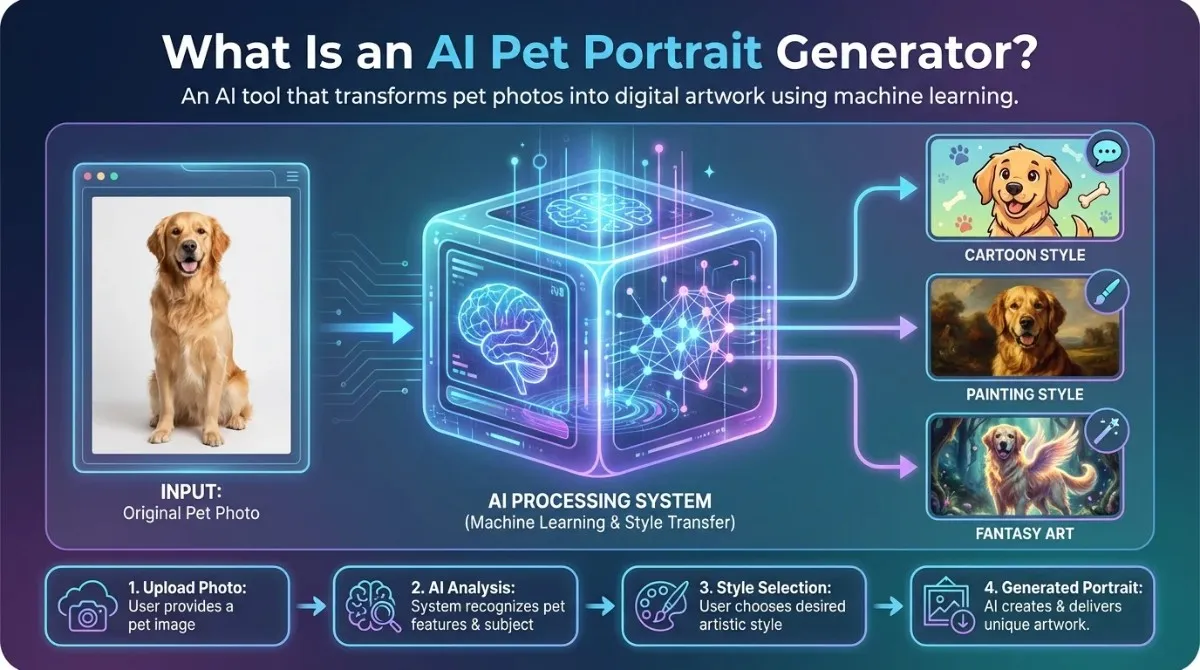
An AI pet portrait generator is a web-based software application that uses artificial intelligence to transform an ordinary pet photograph into a stylized, artistic image. You upload a photo, choose an artistic style, and the AI produces a portrait in seconds.
The term encompasses a wide spectrum of tools, from dedicated pet portrait apps to general-purpose AI image generators that excel at animal subjects. What they share is the underlying technology: machine learning models trained on millions of images that have learned to recognize shapes, textures, fur patterns, and facial features, and to render them in the visual language of different artistic styles.
How the Technology Works: Diffusion Models and Style Transfer
Most modern AI pet portrait generators are built on one of two core technologies: neural style transfer or diffusion models, and increasingly, a combination of both.
The best AI pet portrait generators today use a technique called image-conditioned generation: they treat your pet’s photo as a visual anchor and generate around it, maintaining likeness while transforming style. This is why modern AI portraits look so dramatically better than the early neural style-transfer filters from five years ago.
AI-Generated vs. Hand-Painted Pet Portraits: Key Differences
Before diving into tools and techniques, it is worth being honest about what AI pet portraits are and what they are not. The differences matter.
An AI pet portrait is generated algorithmically in seconds. It has no human artistic intent behind it, no deliberate choice of brushstroke weight, no emotional interpretation of the subject. At the pixel level, AI-generated fur can look slightly repetitive or over-smoothed. Subtle individual expressions, such as the specific way your dog tilts its head when curious, may not survive the stylization process.
A hand-painted portrait by a skilled artist takes days or weeks. It reflects conscious creative decisions. The artist observes your pet’s personality and encodes it in the work. The texture is genuinely physical. It is, in every meaningful sense, a unique object.
That said, for casual use gifts, phone wallpapers, framed prints for a family room, and social media, a high-quality AI pet portrait is indistinguishable from hand-painted work to most viewers. The value proposition is speed and cost, not artistic depth.
Why AI Pet Portraits Have Gone Mainstream
Between 2022 and 2026, AI pet portraits went from a novelty to a genuine consumer category. Several forces drove this shift.
First, the quality of AI image generation improved dramatically. Earlier models produced distorted faces and unnatural textures. Modern diffusion models accurately model animal fur, eyes, and individual markings.
Second, the tools became accessible. You no longer need to understand machine learning to use these generators. The best tools require nothing more than a photo upload and a style selection, a process simpler than ordering a pizza.
Third, pet ownership and the cultural status of pets reached an all-time high. Pets are family members. Commemorating them with art, whether during their lives or as memorials, has moved from eccentric luxury to mainstream sentiment. AI simply made it affordable for everyone.
How to Create an AI Pet Portrait from a Photo
The process is simpler than most people expect. Here is a complete walkthrough from photo selection to final download.
Step 1: Choose the Right Photo of Your Pet
The single biggest factor in the quality of your AI portrait is the quality of your input photo. AI models analyze the visual information in your image. The more information they have, the better the output. Look for a photo with these characteristics:
- Clear, unobstructed view of your pet’s face and, ideally, most of their body.
- Good natural lighting, outdoor daylight, or bright indoor light without harsh flash.
- Your pet is looking roughly toward the camera, or at a slight angle.
- Minimal background clutter, a plain background helps the AI separate your pet from the surroundings.
- High resolution, at least 1 megapixel; most modern smartphones produce perfectly adequate photos.
- When your pet is in a relaxed, natural position, extreme action shots can blur key features.
Photos to avoid: blurry images, heavy backlighting that silhouettes your pet, extreme close-ups that cut off the face, or group shots where your pet is a small element among many.
Step 2: Choose Your Tool and Style
Different AI pet portrait tools specialize in different styles (more on this in the next section). Before uploading, decide what kind of portrait you want. Oil painting? Watercolor sketch? Cartoon? Realistic studio portrait? Your choice of tool should align with your style preferences.
If you are not sure what style you want, most tools offer a gallery or style preview before you commit. Browse these to get a feel for the aesthetic range.
Step 3: Upload, Prompt, and Generate
Most dedicated AI pet portrait tools work on a simple drag-and-drop model: upload your photo, select a style, and click generate. The process takes anywhere from 5 to 60 seconds, depending on the tool and server load.
If you are using a general-purpose AI image generator (such as Adobe Firefly, NightCafe, or a Stable Diffusion interface), you will need to write a text prompt alongside your image upload. Effective prompts for pet portraits include:
- Oil painting portrait of a golden retriever, with dramatic lighting, museum-quality detail, and a warm color palette.
- Watercolor illustration of a tabby cat, soft edges, impressionist style, white background.
- Regal fantasy portrait of a corgi wearing a crown, digital art, highly detailed, 8K resolution.
The key prompt principles are to specify the artistic medium, the mood or lighting, a quality descriptor (‘museum-quality,’ ‘highly detailed,’ ‘8K’), and any specific stylistic references you want.
Step 4: Refine the Result
First-generation outputs are often good but rarely perfect. Most tools let you regenerate with the same settings (producing a different variation) or adjust parameters such as style strength, color temperature, and detail level.
Common refinements include: reducing the style intensity if the portrait has lost likeness, increasing the detail level if the fur or eyes look blurry, or requesting a different composition (portrait orientation vs. landscape).
Step 5: Download Without Watermark and Without Sign-Up
Many free AI pet portrait tools add a watermark to downloaded images unless you create a free account or pay for a premium tier. If you want a watermark-free image without signing up, your options are more limited, but they exist.
Tools like DeepDream Generator and Bing Image Creator (with a free Microsoft account) produce watermark-free downloads without a paid subscription. Adobe Firefly’s free tier also produces clean outputs for personal use.
If you are comfortable creating a free account, tools like NightCafe and Canva AI let you download clean results without a paid plan.
AI Pet Portrait Styles: Every Look You Can Generate
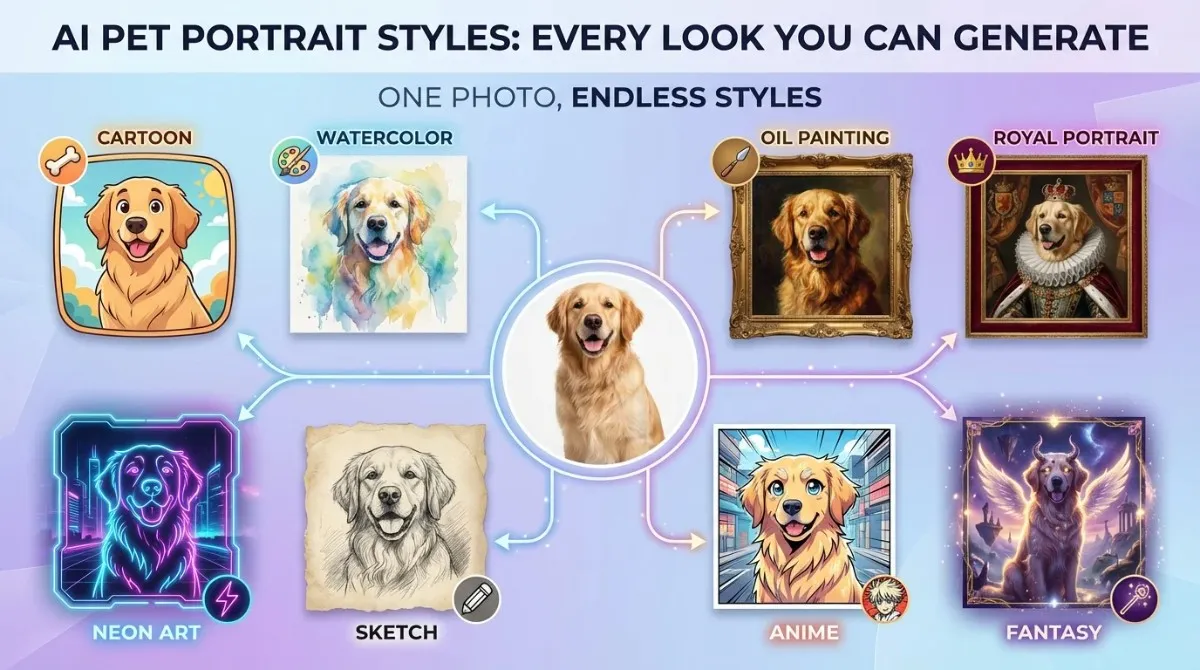
One of the most remarkable things about modern AI pet portrait generators is the sheer range of artistic styles available. Here is a breakdown of the most popular and what makes each one work.
Oil Painting Style
Oil painting is the most requested AI pet portrait style by a significant margin. It evokes the tradition of formal portraiture, the kind of painting that hangs in stately homes and fine art galleries. At its best, an AI oil painting of your pet will render individual hairs in your dog’s coat with visible brushwork, creating the impression of a canvas you could reach out and touch.
The style works especially well for dogs and cats with expressive faces and distinctive markings. Short-haired breeds and solid-colored animals tend to produce cleaner, more dramatic results. Long-haired breeds can sometimes look over-textured, though this is improving rapidly with newer models.
Watercolor and Sketch Style
Watercolor AI portraits have a soft, luminous quality that suits small animals particularly well, rabbits, guinea pigs, birds, and cats with fine features. The aesthetic is more impressionistic: edges bleed gently, backgrounds fade to white, and colors bleed into one another in a way that feels hand-crafted.
Pencil sketch and charcoal styles are related variants that strip the portrait down to pure line work. These are particularly effective for profile shots and work well in black and white.
Cartoon and Anime Style
Cartoon-style AI pet portraits simplify your pet’s features into clean shapes, bold outlines, and vivid colors. The result is immediately recognizable as your pet but rendered in the visual language of animated characters.
This style aligns with the broader AI capability of transforming cartoon-style input images into realistic ones, and vice versa. The ‘cartoon to real life’ direction is a growing sub-category: users upload illustrated or stylized pet images and ask AI to render them as photorealistic animals, or go in the opposite direction to cartoonize real pets.
Anime-style portraits take this further, rendering pets in the distinctive aesthetic of Japanese animation: large expressive eyes, simplified color blocks, dynamic linework.
Realistic Studio Portrait Style
Rather than transforming your photo into a different artistic medium, some AI tools produce hyper-realistic, enhanced versions of your pet with studio lighting, pristine backgrounds, and professional depth-of-field control. The result looks like a photo taken by a professional animal photographer rather than a painting.
This style is particularly effective for competition-quality portraits, breeding records, or as keepsakes for show animals. The AI effectively acts as a digital photography studio.
Royal, Renaissance, and Regal Styles
One of the most popular novelty applications of AI pet portraits is rendering animals in historical portrait styles. Velvet doublets. Gold-leaf backgrounds. Crowns, armor, and elaborate collars. The ‘noble animal’ aesthetic has been enormously popular on social media and as a gift category.
These portraits work by merging the animal’s likeness with historical portrait templates, such as the composition, clothing, and setting of a 16th-century court painting, with your corgi’s face occupying the position of the human subject.
Skin Texture and Fur Rendering: What Makes a Portrait Look Real
At a technical level, the quality of an AI pet portrait largely depends on how well the model renders skin texture and fur. These are among the most complex visual elements for AI to reproduce convincingly.
High-quality AI models handle fur by generating directional strands with individual highlights and shadows rather than producing a uniform texture. The result is fur that catches light differently at different angles, the way real animal coats do.
Eyes are the other critical element. A portrait can have perfect fur rendering and still feel lifeless if the eyes are flat or misshapen. The best AI models pay particular attention to the catchlight, the small reflection of light in the eye, which is what makes a portrait feel alive.
Best Free AI Pet Portrait Generators
The market for AI image generation tools is large and fast-moving. Below is a feature comparison of the most widely used tools as of 2026, with a focus on free access and sign-up requirements.
| Tool | Free Tier | No Sign-Up | Watermark-Free | Best Style |
| Fotor AI | Yes | No | Paid only | Oil painting, realistic |
| PetPortraitAI | Limited | No | Paid only | Watercolor, cartoon |
| DeepDream Generator | Yes | Yes | Yes | Abstract, painterly |
| NightCafe | Yes (credits) | No | Yes | Multiple styles |
| Adobe Firefly | Yes (credits) | No | Yes | Realistic, studio |
| Canva AI | Yes (limited) | No | Yes (Canva watermark) | Cartoon, illustrated |
| Bing Image Creator | Yes | Microsoft login | Yes | Realistic, oil |
Free vs. Paid: What You Actually Get
Free tiers across AI image generation tools typically include: limited daily or monthly generation credits, reduced output resolution (often 512×512 or 1024×1024 instead of 4K+), watermarked downloads in some cases, and longer queue times during peak hours.
Paid tiers generally unlock higher-resolution output, faster generation, more style options, commercial licensing, watermark-free downloads, and the ability to fine-tune the model to your specific pet’s appearance for higher-fidelity results.
For most personal use, a framed 8×10 print, a phone wallpaper, or a greeting card, the free tier of a good tool is more than sufficient. The resolution difference only becomes apparent in large-format print situations.
Quality Benchmarks: Fur Detail, Background, and Accuracy
When evaluating the quality of AI pet portraits, focus on three things. First, fur or feather detail: does it look like individual strands, or a uniform texture? Second, background integration: does the background complement the subject, or does it clash awkwardly with the portrait style? Third, likeness accuracy: does the portrait actually look like your specific pet, with their distinctive markings and proportions, or a generic animal of that breed?
Of these, likeness accuracy is where most free tools fall short. Without a fine-tuning step (which requires more computational resources and is usually a paid feature), AI tools produce portraits that look like plausible members of your pet’s species but may not capture the individual’s unique features.
Creative Uses for AI Pet Portraits
The portrait itself is only the beginning. Here is how people are using AI pet portraits.
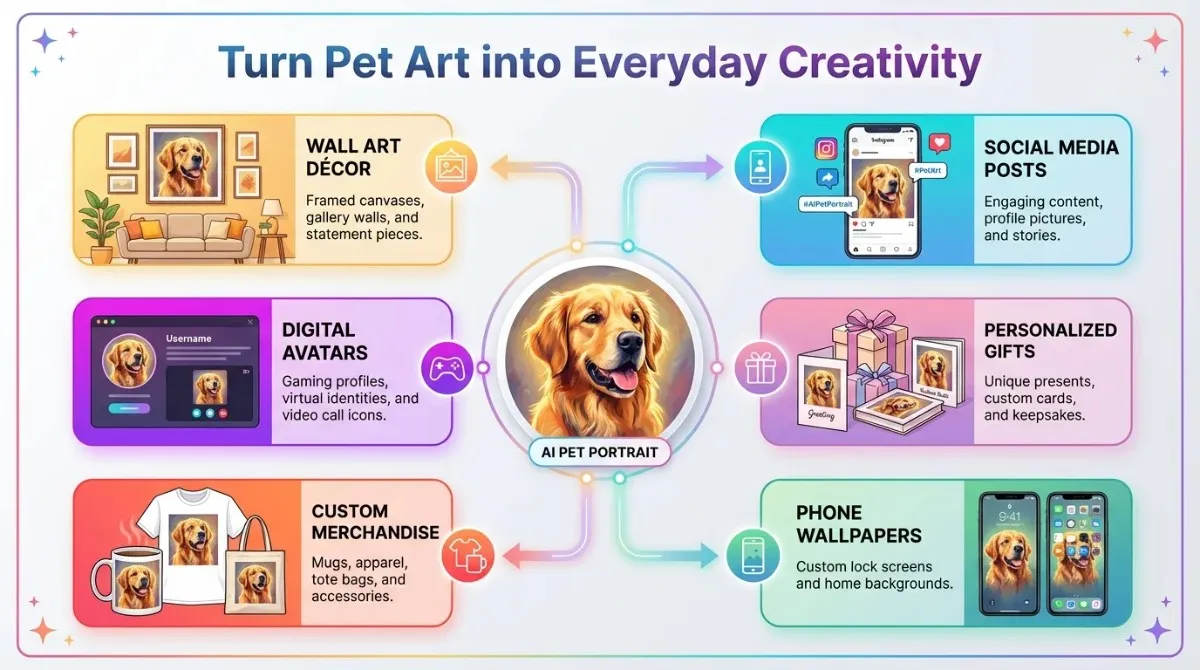
Gifts and Personalized Merchandise
AI pet portraits have become one of the most popular categories of personalized gifts. Services like Printful, Redbubble, and Zazzle will print your AI-generated portrait on canvas, mugs, phone cases, tote bags, t-shirts, cushions, and dozens of other items.
The workflow is simple: generate a high-resolution portrait, download it, upload it to a print-on-demand service, and order. Turnaround from pet photo to doorstep delivery can be as fast as five to seven days.
This has made what was once a luxury gift, a custom-commissioned painting on canvas, accessible at a price point that fits almost any budget.
Pet Memorial Portraits
One of the most emotionally significant uses for AI pet portrait generators is memorial portraiture. When a beloved pet passes away, many owners want to preserve their memory in a form more enduring than a digital photo. A framed portrait, even an AI-generated one, carries a different emotional weight.
For this use case, likeness accuracy matters more than it does in novelty applications. If you are creating a memorial portrait, invest time in selecting the best possible source photo and consider using a paid tool with fine-tuning capabilities to ensure the portrait captures your pet’s unique appearance as faithfully as possible.
Phone Wallpapers and Social Media
For digital use, the requirements are less demanding, and the free tier of most tools works perfectly. A 1024×1024 AI portrait works beautifully as phone wallpaper, a profile picture, or a social media post.
Cartoon and anime styles tend to perform particularly well on social media; they are bold, colorful, and immediate, and they read clearly even at thumbnail size.
Home Decor: From AI Art to Printed Canvas
A framed AI pet portrait on a living room wall is the most conventional application and the one that most directly replaces the traditional commissioned portrait. For this use, output resolution matters most. Aim for at least 2048×2048 pixels for a print up to 16×16 inches, and use 4K resolution for anything larger.
Many print services offer canvas stretching, framing, and gallery wrapping, so the finished product arrives ready to hang. The visual gap between an AI canvas print and a hand-painted original at an ordinary viewing distance is minimal for most painting styles.
AI Image Generators and Home Design
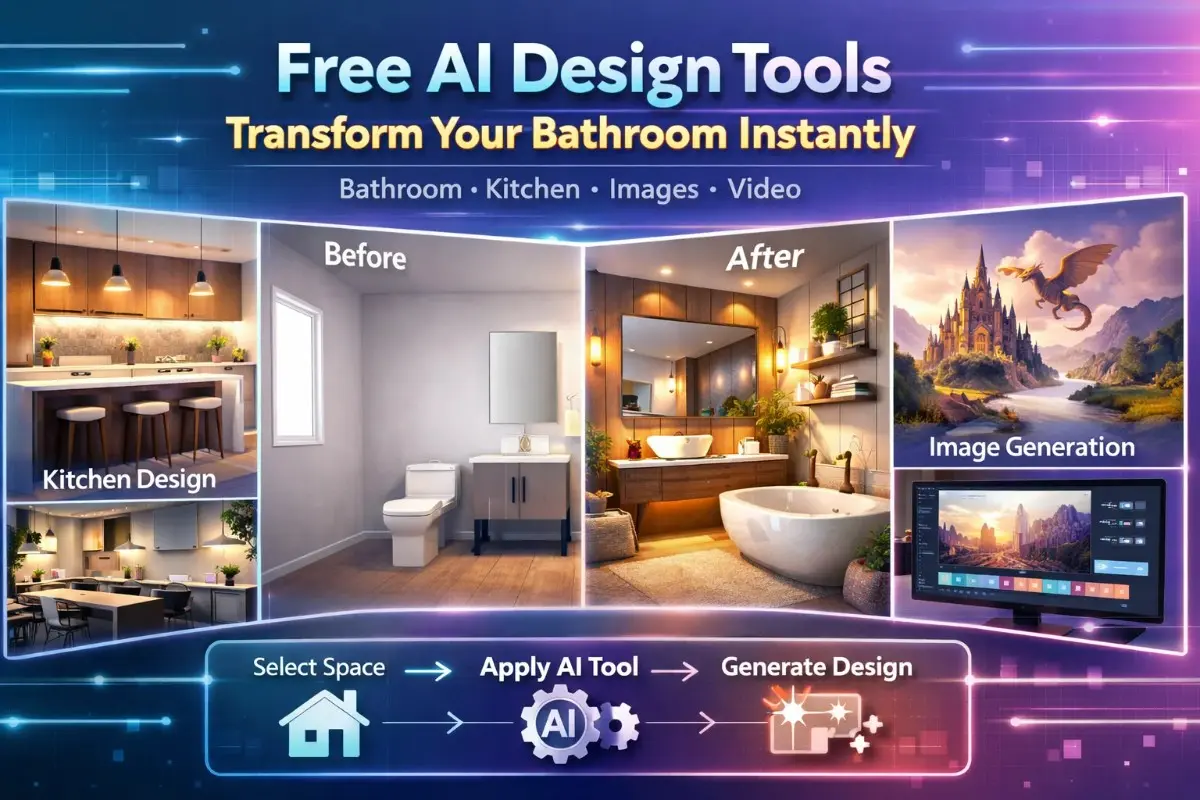
A natural extension of the AI image generation technology behind pet portraits is architectural and interior visualization. The same diffusion models that render oil-painted cats can transform a photograph of your living room into a redesigned space with new furniture, color schemes, or layout.
Tools with features like an ‘interior design slider’ or ‘magic brush’ allow homeowners to paint over sections of a room photo and replace them with AI-generated redesigns, helping them visualize what a new kitchen, exterior renovation, or garden would look like before committing to the work. This is the same technology, applied to a different subject.
AI Pet Portrait Generator vs. Hiring a Real Artist
The question of AI versus human artist is not a simple one. Here is an honest comparison across the dimensions that matter most.
Cost Comparison
A commissioned pet portrait from a professional artist costs, on average, between $150 and $800, depending on the artist’s reputation, the size of the work, the medium, and the complexity of the subject. Renowned animal portrait artists can charge significantly more.
An AI pet portrait costs between $0 (free-tier tools) and $30 (premium-tier access with high-resolution output). Print-on-demand canvas prints range from $20 to $80, depending on size and finish. Total cost for a framed AI canvas print: typically under $60.
Turnaround Time
AI generation takes seconds to minutes. Refining and downloading adds at most an hour. Print-on-demand production and shipping: five to ten days.
A commissioned artist typically quotes two to eight weeks for completion, depending on their workload and the complexity of the piece.
Quality and Emotional Value
Here is where the comparison becomes more nuanced. AI portraits are technically impressive but artistically anonymous. They do not carry the mark of a specific human’s creative vision. A great artist’s portrait of your pet is, in some sense, a dialogue the artist observes, interprets, and makes choices. That process produces something genuinely irreplaceable.
AI portraits, on the other hand, are consistent, fast, and require no coordination. For many use cases, casual gifts, digital use, and décor, this is entirely sufficient.
When to Choose AI, When to Choose Human
Choose AI when: you want something quickly, you are working with a limited budget, you want to experiment with multiple styles, the end use is digital or print-on-demand merchandise, or you need volume (multiple pets, multiple formats).
Choose a human artist when: you want a unique, irreplaceable artwork; the portrait is for a significant occasion (a 10th-anniversary gift, a memorial for a deeply loved animal); you want the artist to capture personality rather than just appearance; or you are purchasing art as a long-term investment.
Final Thoughts
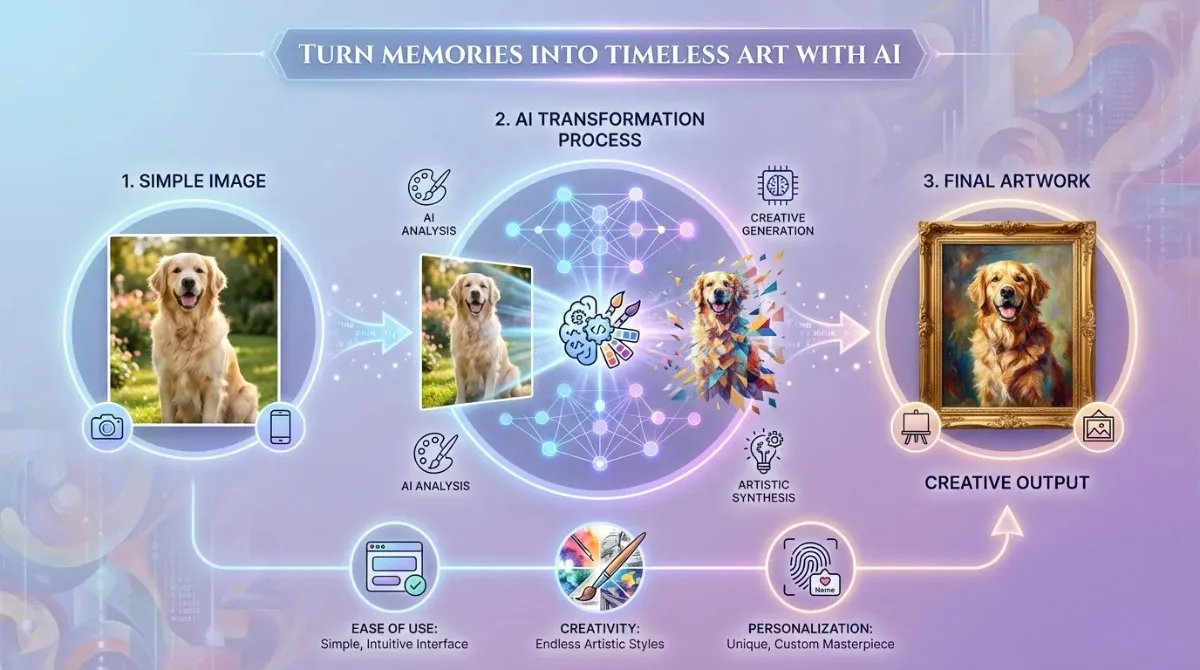
The AI pet portrait generator has transformed what was once an expensive, time-consuming custom art commission into a process that takes minutes and costs nothing. In 2026, the quality of the best tools is genuinely remarkable, capable of producing portraits that will surprise you with how much they capture the essence of your animal companion.
The key is knowing how to use them well: starting with a great photo, choosing the style that suits your end use, understanding the limitations of free tiers, and calibrating your expectations around likeness accuracy. With those considerations in mind, the barrier between your pet and a stunning portrait has effectively disappeared.
Your next steps: choose a tool from the comparison table above, find your best pet photo, pick a style that excites you, and generate your first portrait. Keep the file, print it, frame it, or turn it into a gift. The process takes less time than it takes to read this guide.
Frequently Asked Questions (FAQs)
Is an AI pet portrait generator free?
Many AI pet portrait generators offer genuinely free tiers. Tools like DeepDream Generator, Bing Image Creator, and NightCafe’s free credits allow you to generate portraits at no cost. The limitations of free tiers typically include lower resolution, watermarked downloads, or a monthly credit cap rather than a complete feature block. For most personal use cases, the free tier is entirely sufficient.
How accurate will the portrait be?
Accuracy varies significantly between tools and depends heavily on your source photo. In general, modern AI pet portrait generators are excellent at capturing breed characteristics and general appearance, but may not perfectly replicate your specific pet’s individual markings, proportions, or expressions. Tools with a fine-tuning or ‘training’ feature, where the AI is specifically optimized on multiple photos of your pet, produce significantly more accurate likenesses. These features are typically on paid tiers.
Can I use the AI portrait commercially?
This depends on the specific tool and its terms of service. Many free tools grant personal use rights but restrict commercial applications. Adobe Firefly explicitly provides commercial licensing for outputs generated using its free and paid tiers. NightCafe and other tools specify in their terms whether commercial use is permitted. Always read the licensing terms before using AI-generated images in a business context.
What breeds and species are supported?
General-purpose AI image generators can support virtually any animal, since their training data includes images of a wide range of domestic and wild species. Dedicated pet portrait tools are typically optimized for dogs and cats, the largest market segments, but most will produce good results for rabbits, birds, horses, reptiles, and other pets. Exotic or unusual species may produce less accurate results.
What image format and resolution do I receive?
Most AI pet portrait tools deliver outputs as JPEG or PNG files. Free tiers typically produce images between 512×512 and 1024×1024 pixels. Paid tiers often offer 2048×2048 or higher, with some tools producing 4K (4096×4096) outputs suitable for large-format printing. Always check the resolution before downloading if you plan to print the portrait.
Is my pet’s photo stored or used to train AI models?
This is an important question with tool-specific answers. Most reputable AI tools publish a privacy policy that specifies whether uploaded images are stored, for how long, and whether they are used in model training. Adobe Firefly explicitly states that user uploads are not used to train its models. Other tools vary. If privacy is a concern, read the privacy policy before uploading, or use a tool that processes images locally rather than on a cloud server, though these are less common.