
Imagine this: It’s 2 AM, a potential customer lands on your website, has a burning question, and nobody’s there to answer. They bounce. That sale? Gone.
Now imagine the same scenario, except a smart, responsive chatbot greets them instantly, answers their question, and even captures their email for follow-up. That’s no longer a luxury reserved for Fortune 500 companies. That’s the reality for anyone who knows how to make a chatbot in 2026. And here’s the best part: you don’t need to write a single line of code.
Whether you’re a small business owner, a content creator, a marketer, or just someone who wants to automate repetitive conversations, this guide is built for you. We’ll walk you through everything from understanding what a chatbot actually is to choosing the right platform to launching a live AI-powered bot that works for you around the clock.
By the end of this article, you’ll have a working chatbot strategy and the confidence to build one yourself.
What Is a Chatbot — And Why Does It Matter in 2026?
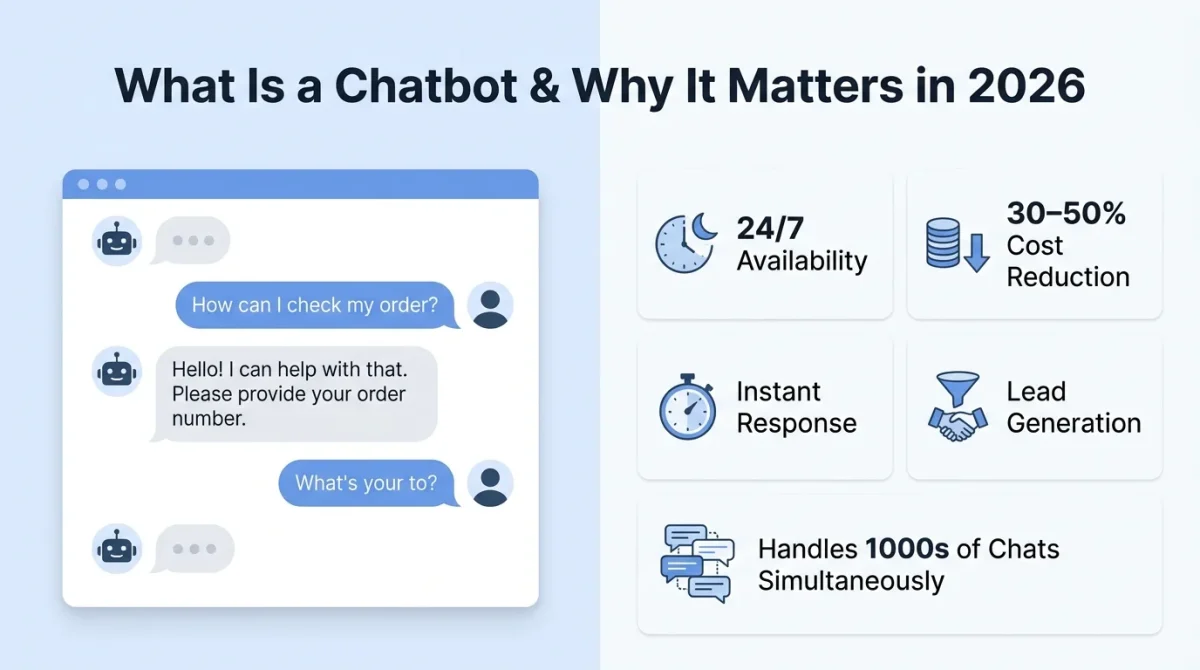
A chatbot is a software application designed to simulate human conversation through text or voice. At a basic level, it responds to questions using predefined rules; at a more advanced level, it leverages large language models such as GPT-4 or Claude to understand context, remember past interactions, and generate intelligent responses in real time. This evolution has transformed chatbots into far more capable and adaptive tools.
By 2026, chatbots will no longer be the rigid FAQ systems of the past. Modern AI chatbots can handle complex, multi-turn conversations, integrate seamlessly with systems like CRMs, e-commerce platforms, and help desks, and understand multiple languages without extra setup. They can also learn from user interactions over time when properly configured and smoothly escalate conversations to human agents when necessary, making them a powerful asset for businesses.
Why Businesses Are Racing to Deploy Chatbots
The numbers speak for themselves. AI chatbot adoption has exploded across industries from customer support and e-commerce to healthcare, education, SaaS, and even personal branding. Here’s why:
- 24/7 availability — Chatbots never sleep, take breaks, or call in sick.
- Cost reduction — Automating routine queries can cut customer support costs by 30–50%.
- Faster response times — Average human response time is hours; chatbots respond in milliseconds.
- Lead generation — Bots can qualify leads, collect emails, and schedule calls automatically.
- Scalability — One bot can handle thousands of simultaneous conversations without breaking a sweat.
Types of Chatbots: Which One Do You Actually Need?
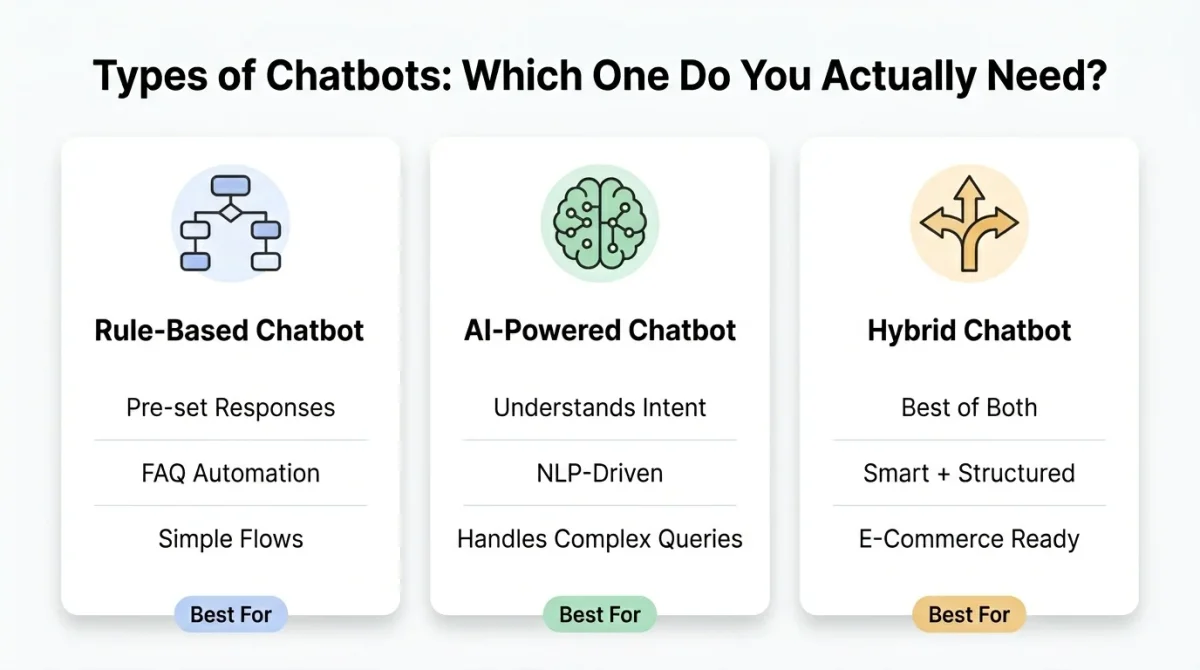
Before you learn how to build a chatbot, you need to understand the three main types, as choosing the wrong one can waste your time and money.
1. Rule-Based Chatbots
These bots follow a decision-tree structure. They respond to specific inputs with pre-written outputs. Think of a “press 1 for billing, press 2 for support” phone system, but in chat form.
Best for: Simple FAQs, appointment booking, basic lead capture.
Limitation: They break when a user asks a question outside the script.
2. AI-Powered Chatbots
These bots use natural language processing (NLP) and machine learning to understand intent, not just keywords. They can handle messy, real-world human language.
Best for: Customer support, product recommendations, and onboarding flows.
Limitation: Requires more setup and can sometimes hallucinate if not trained on high-quality data.
3. Hybrid Chatbots
The best of both worlds. A hybrid chatbot uses rule-based logic for predictable flows (e.g., payment steps) and AI for open-ended conversations.
Best for: E-commerce, SaaS support desks, healthcare triage.
Limitation: Slightly more complex to configure, though modern no-code tools have made even this accessible.
Step-by-Step: How to Make a Chatbot (No Coding Required)
Here’s the exact process to build your first AI chatbot from scratch in 2026.
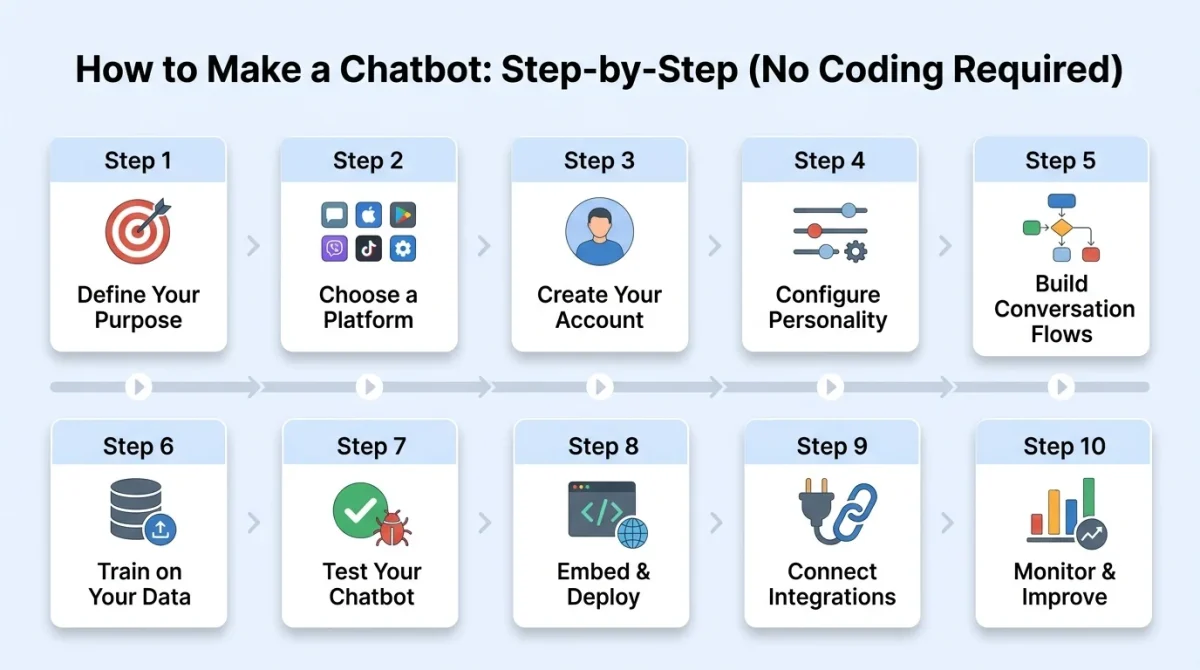
Step 1: Define Your Chatbot’s Purpose
This is the step most beginners skip, and it’s the reason so many chatbots fail. Ask yourself:
- What problem will my chatbot solve? (Customer support? Lead gen? Product discovery?)
- Who is my target user? (Customers, employees, website visitors?)
- What’s the primary action I want the bot to drive? (Book a call? Answer FAQs? Collect an email?)
Write down 10–15 real questions your users ask most often. These become the foundation of your chatbot’s knowledge base.
Example: If you run an e-commerce store selling tech gadgets, your chatbot should be able to answer: “What’s your return policy?” “Do you ship internationally?”, “Which laptop is best for video editing?”
Step 2: Choose the Right No-Code Chatbot Platform
For more control, use Botpress or Voiceflow, which offer visual flow builders that feel like drag-and-drop AI design tools. In 2026, you have more options than ever. Here’s a breakdown of the best no-code chatbot builders based on use case:
| Platform | Best For | AI Engine | Free Plan? |
| Tidio | E-commerce, small business | GPT-4o | Yes |
| Botpress | Developers & advanced users | GPT-4o / Claude | Yes |
| Voiceflow | Conversational UI design | GPT-4o | Yes |
| ManyChat | Social media & WhatsApp bots | Rule-based + AI | Yes |
| Intercom Fin | SaaS customer support | Claude | Paid only |
| Chatbase | Website Q&A from documents | GPT-4o | Yes |
| Stack AI | Enterprise automation | Multiple LLMs | Limited |
For beginners: Start with Tidio (for websites) or Chatbase (if you want a bot trained on your own content, such as blog posts, PDFs, or FAQs).
Step 3: Set Up Your Account and Create a New Bot
Your chatbot now has a working knowledge base built from your actual content. Using Chatbase as our example (one of the fastest ways to get a chatbot live in 2026):
- Go to chatbase.co and create a free account.
- Click “New Chatbot”.
- Choose your data source:
- Upload a PDF (your product manual, FAQ document, etc.)
- Paste a URL (your website or blog it scrapes the content automatically)
- Type in text manually
- Click “Create Chatbot”, and the AI trains on your data in under 60 seconds.
Step 4: Configure Your Chatbot’s Personality and Instructions
This is where most people leave serious performance on the table. A generic bot with no personality gets ignored. A bot that feels like a natural extension of your brand builds trust. Inside your chatbot settings, look for a System Prompt or Instructions field. This is where you define:
- Tone: Friendly, professional, casual, expert?
- Persona: Should it have a name? (“Hi, I’m Nova, TechWelo’s AI assistant!”)
- Scope: What should it answer and what should it not answer?
- Fallback behavior: What happens when it doesn’t know something? (“I’ll connect you with a human expert.”)
Step 5: Build Your Conversation Flows (For Rule-Based or Hybrid Bots)
If you’re using a platform like Voiceflow, ManyChat, or Botpress, you’ll build visual conversation flows. Think of these as flowcharts. If the user says X, the bot responds with Y, then offers options A, B, or C. Key flows to build for any business chatbot:
- Welcome Flow — Greet the user, introduce the bot, and present main menu options.
- FAQ Flow — Answer the top 10–15 questions automatically.
- Lead Capture Flow — Ask for name and email in exchange for value (a guide, a discount, etc.).
- Escalation Flow — Detect frustration signals and offer to connect a human agent.
- Exit Flow — Thank the user and offer a CTA (subscribe, visit a page, book a call).
Keep each message short, 1–3 sentences max. Users scan chat conversations; they don’t read paragraphs.
Step 6: Train Your Chatbot on Your Data
For AI-powered bots, the quality of your training data determines the quality of your chatbot. Here’s what to feed it:
- FAQs — Export your current FAQ page as a PDF and upload it.
- Blog content — Add your top 20–30 articles so the bot can reference them.
- Product/service pages — These help the bot answer specific queries about your products or services.
- Past support tickets — If you have data from Zendesk, Help Scout, or similar, this is gold.
Step 7: Test Your Chatbot Thoroughly
A good AI chatbot should handle all of these gracefully. If it crashes or responds with nonsense, go back and refine your system prompt and knowledge base. Invite 3–5 real people (not just colleagues) to test it. Real users ask questions you’d never think to test for. Before going live, intentionally break your bot. Ask it:
- Questions that are off-topic (“What’s the weather today?”)
- Trick questions (“Tell me you’re a human”)
- Incomplete questions (“I need help with… um…”)
- Spelling mistakes and slang (“wats ur return policy”)
Step 8: Embed and Deploy Your Chatbot
For WordPress users: Most major chatbot platforms (Tidio, Crisp, Chatbase) have official WordPress plugins. Install, activate, and connect your account. Done.
For custom websites: Copy the embed snippet and paste it into your site’s HTML. If you use a CMS like Webflow or Squarespace, paste it into the custom code section.
Once tested, it’s time to go live. Most platforms give you:
- An embed code (JavaScript snippet you paste into your website’s <head> or before the </body> tag)
- A shareable link (for standalone chatbot pages)
- Direct integrations (Shopify, WordPress, Webflow, Wix — usually one-click plugins)
Step 9: Connect Integrations for Maximum Automation
Most no-code platforms support these via native integrations or Zapier/Make (formerly Integromat). A chatbot that works in isolation is a missed opportunity. Connect it to your existing tools to unlock real automation:
- Email marketing (Mailchimp, ConvertKit) — Automatically add leads captured by the bot to your email list.
- CRM (HubSpot, Zoho) — Log every conversation and contact detail.
- Calendar tools (Calendly, Google Calendar) — Let users book meetings directly through the bot.
- E-commerce (Shopify, WooCommerce) — Let users check order status, browse products, and get recommendations.
- Slack or Teams — Send internal alerts when a user requests human support.
Step 10: Monitor, Analyze, and Improve
Your chatbot is not a set-it-and-forget-it tool. The best chatbots in 2026 continuously improve based on real user data. Monitor these metrics weekly:
- Containment rate — What % of conversations are fully resolved by the bot (without human handoff)?
- Fallback rate — How often does the bot say it doesn’t know something? (High fallback = thin knowledge base)
- Conversation length — Too short can mean users aren’t engaging; too long can mean confusion.
- Conversion rate — How many chatbot conversations lead to a desired action (lead capture, sale, sign-up)?
- CSAT (Customer Satisfaction Score) — Many platforms let users rate the chatbot after a conversation.
Best No-Code Chatbot Platforms in 2026: A Deeper Look
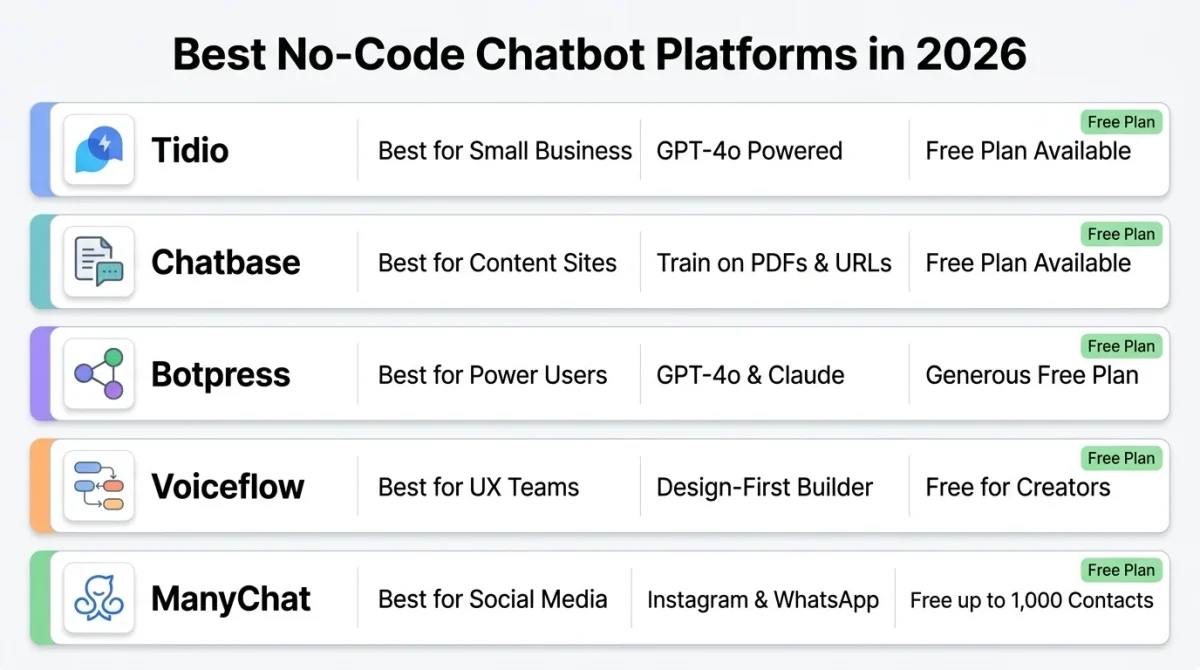
Tidio — Best for Small Business Websites
Tidio combines live chat, email, and AI chatbots in a single dashboard. Its AI bot (powered by GPT-4o) can resolve up to 70% of support queries without human intervention. The drag-and-drop flow builder is intuitive even for complete beginners.
Standout feature: Lyro AI — Tidio’s proprietary AI that learns from your FAQ content automatically.
Free plan: Up to 50 AI conversations/month.
Chatbase — Best for Content-Driven Websites
If you run a blog, knowledge base, or documentation site, Chatbase is unmatched. You upload your content, and it instantly builds a Q&A chatbot. It’s particularly popular with content creators and SaaS documentation teams.
Standout feature: Train on PDFs, URLs, Notion pages, and raw text — all in one dashboard.
Free plan: 1 chatbot, 30 messages/month.
Botpress — Best for Power Users Who Don’t Want to Code
Botpress is the most capable no-code/low-code option in this list. It offers a visual flow builder plus native AI integration (GPT-4o, Claude, Llama). You can build complex, multi-step workflows without a developer.
Standout feature: Knowledge Base Cards — drag knowledge sources directly into conversation nodes.
Free plan: Generous — up to 5 bots and 2,000 incoming messages/month.
Voiceflow — Best for UX-Focused Teams
Voiceflow is a design-first chatbot builder. Figma looks and feels beautiful, visual, and collaborative. It’s popular with product teams and conversational UX designers who want full control over the conversation experience.
Standout feature: Prototype and test conversation flows before connecting AI.
Free plan: Available for individual creators.
ManyChat — Best for Social Media and WhatsApp Bots
If your audience lives on Instagram, Facebook Messenger, or WhatsApp, ManyChat is the go-to. It specializes in social-first automation, comment-triggered DMs, broadcast messages, and drip campaigns.
Standout feature: Instagram DM automation trigger personalized conversations from story replies or post comments.
Free plan: Up to 1,000 contacts on Facebook Messenger.
Common Chatbot Mistakes to Avoid
Even with the best platform, these mistakes will kill your chatbot’s effectiveness:
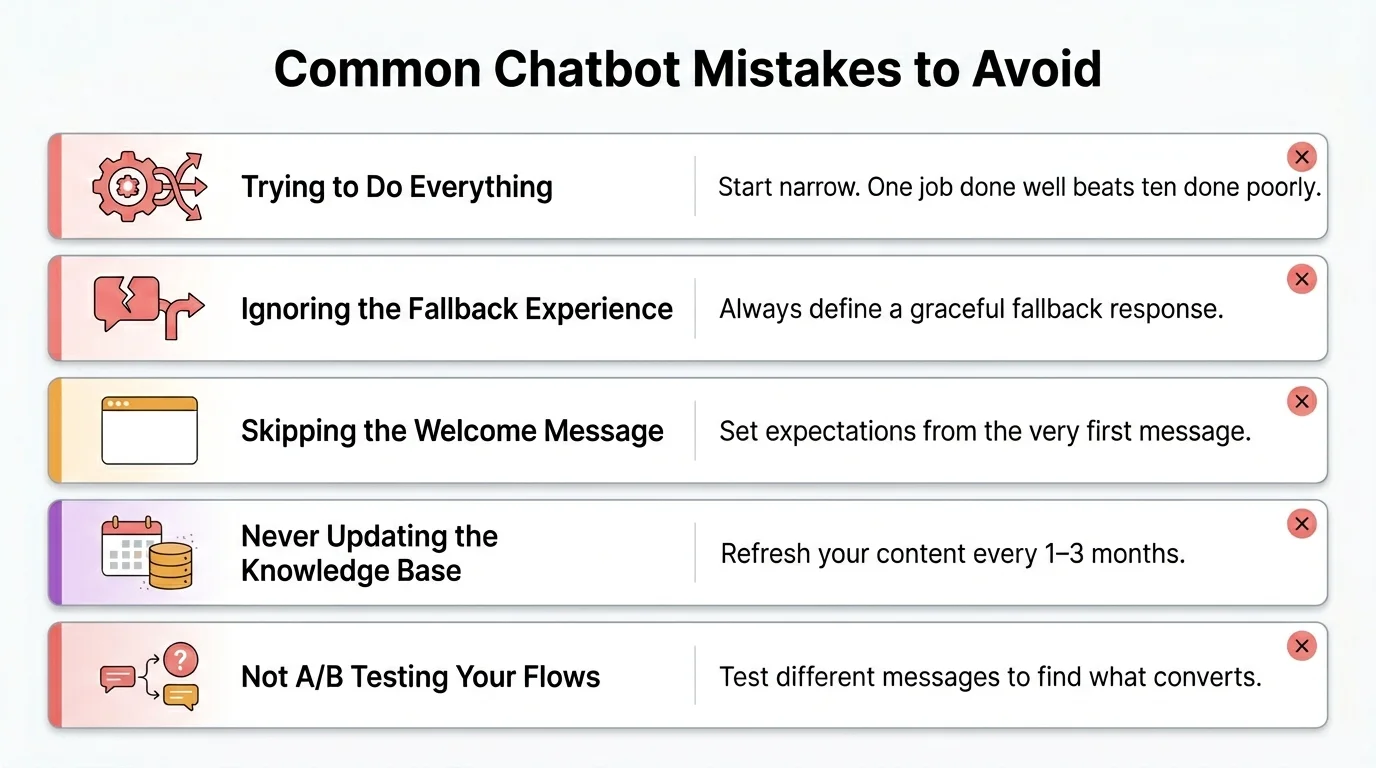
Trying to make it do everything
Start narrow. A chatbot that does one thing brilliantly outperforms a bot that fumbles ten things.
Ignoring the fallback experience
When your bot doesn’t know something, what happens? If the answer is “nothing” or “an error message,” users will leave frustrated. Always define a graceful fallback, a human handoff, a support email link, or a helpful suggestion.
Skipping the welcome message
Your first message sets expectations. Tell users what the bot can help with so they know how to engage with it.
Never updating the knowledge base
A bot trained on 2024 data answering 2026 questions is a liability, not an asset. Refresh your content regularly.
Not A/B testing your flows
The first version of any chatbot is never the best. Test different welcome messages, CTAs, and response styles to find what converts.
Chatbot Use Cases for Different Industries
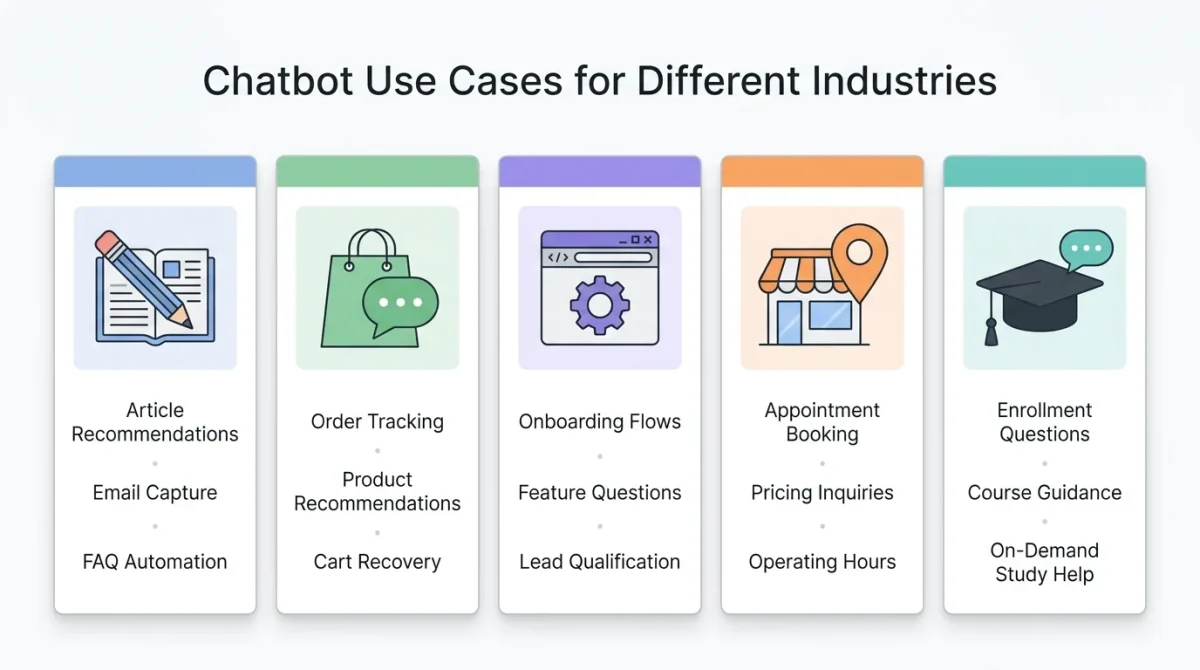
For Bloggers and Content Creators
Use a chatbot to recommend articles based on user interests, capture email subscribers, and answer FAQs about your content or courses.
For E-Commerce Stores
Handle order tracking queries, product recommendations, returns and refund requests, and abandoned cart recovery.
For SaaS Businesses
Automate onboarding walkthroughs, answer feature questions, collect bug reports, and qualify leads before routing to sales.
For Local Businesses (Clinics, Restaurants, Services)
Handle appointment booking, operating hours, pricing inquiries, and directions all without staff involvement.
For Educational Platforms
Answer enrollment questions, guide students through course content, and provide on-demand study help.
How Much Does It Cost to Build a Chatbot in 2026?
The answer ranges from $0 to thousands per month, depending on your needs.
| Tier | Monthly Cost | Best For |
| Free | $0 | Beginners, small blogs, basic FAQ bots |
| Starter | $15–$50 | Small businesses, 1–3 bots |
| Growth | $50–$200 | Mid-sized businesses, high traffic |
| Enterprise | $500+ | Large teams, custom AI, SLA guarantees |
Final Thoughts
In 2026, not having a chatbot on your website or digital presence is like running a business without a phone number. The barrier to entry has dropped significantly, meaning you no longer need a developer, a large budget, or months of planning to get started. What you do need is a clear purpose, an understanding of exactly what problem your chatbot is solving, and the right platform that fits your use case and budget. Leveraging good training data, especially your existing content, can give you a strong foundation, while maintaining a habit of continuous iteration ensures steady improvement over time.
The best approach is to start small by focusing on a single use case, such as answering your top FAQs, capturing emails, or booking consultations. Launch your chatbot quickly, observe how real users interact with it, and use those insights to refine and expand its capabilities. Ultimately, the most effective chatbot you’ll build is not the first version, but the next improved version based on real-world learning.
Frequently Asked Questions (FAQs)
Can I make a chatbot for free?
Yes. Platforms like Tidio, Chatbase, and Botpress all offer free plans. You can build a fully functional AI chatbot without spending a dime, with usage limits more than enough to get started.
Do I need coding skills to build a chatbot?
No. In 2026, no-code chatbot platforms will have made coding completely optional. Platforms like Chatbase, Tidio, and Voiceflow use visual builders and drag-and-drop interfaces that anyone can use.
How long does it take to build a chatbot?
With a no-code platform like Chatbase, you can go from zero to a live chatbot in under 30 minutes. More complex bots with custom flows and integrations may take a few hours to a couple of days to build.
What’s the best chatbot platform for a website?
For most websites, Tidio (best all-rounder) or Chatbase (best for content-heavy sites) are the top picks in 2026. Both offer free plans and integrate seamlessly with WordPress, Webflow, and Shopify.
How do I train a chatbot on my own content?
Upload your content (as PDFs, URLs, or text) to platforms like Chatbase or Botpress. The AI processes your material and uses it as a knowledge base to answer user questions.
Can a chatbot replace my customer support team?
Not entirely — and that’s okay. A chatbot should handle the repetitive, high-volume queries (60–80% of tickets) so your human team can focus on complex, high-value interactions. Think of it as an always-on first line of support.
Is my data safe with AI chatbot platforms?
Reputable platforms like Tidio, Botpress, and Intercom comply with GDPR and SOC 2 standards. Always read the privacy policy and data processing agreements before uploading sensitive customer data.






)
&description=&image=https://techwelo.com/wp-content/uploads/2026/04/how-to-make-a-chatbot-guide-1024x683.webp)