You opened Janitor AI, ready to dive into a rich roleplay session and hit a wall. The default JanitorLLM feels slow. The responses are repetitive. You’ve heard people talk about DeepSeek, but every setup guide you’ve found either skips critical steps or was written for an older version of the interface. You’re not alone. This is one of the most searched frustrations in the Janitor AI community right now.
Here’s the good news: how to set up DeepSeek on Janitor AI is not complicated once you understand the logic behind it. You’re essentially replacing Janitor AI’s default brain with DeepSeek’s powerful language model, using a Bring Your Own Key (BYOK) approach. Janitor AI becomes the interface. DeepSeek becomes the engine.
This guide walks you through the complete process from generating your API key to configuring the base URL, selecting the right DeepSeek model, and troubleshooting the errors that trip up most users. No fluff. No skipped steps.
What Is DeepSeek and Why Use It With Janitor AI?
Before touching any settings, it’s worth understanding why this combination works so well.
DeepSeek is a family of large language models (LLMs) developed by a Chinese AI research lab. Despite the name, it has nothing to do with web search; it’s a direct competitor to GPT-4 and Claude in the conversational AI space. As of 2026, DeepSeek V3 (and specifically the V3.2 update) is the version most Janitor AI users are running.
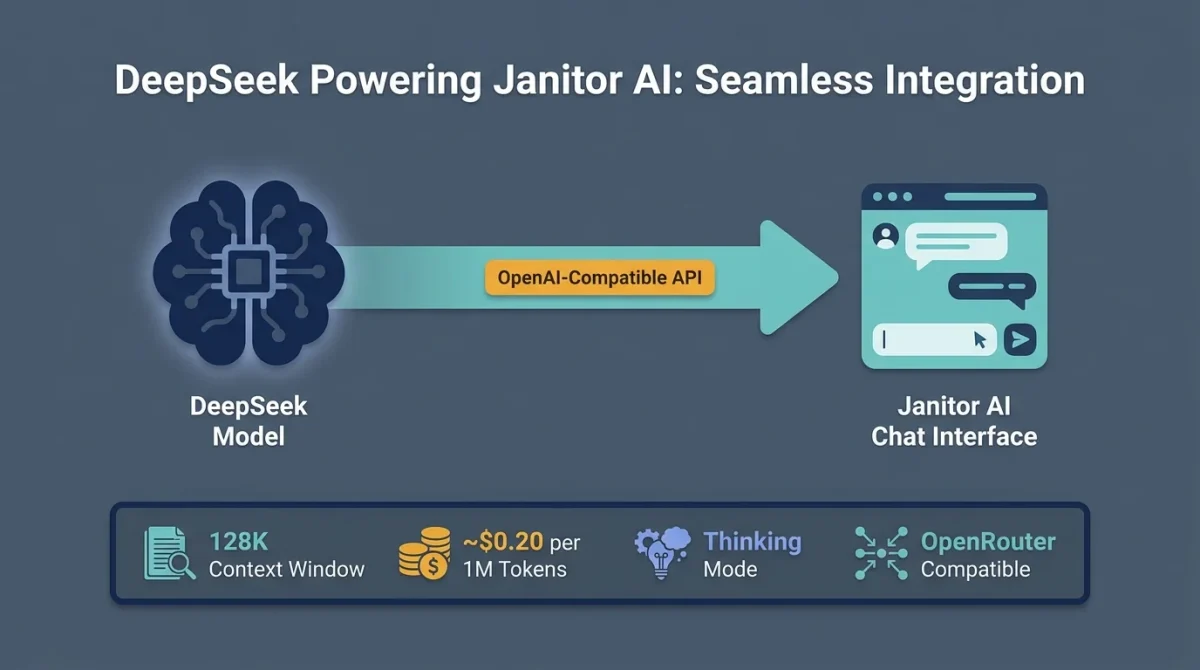
DeepSeek uses an OpenAI-compatible API structure, which is the key reason the integration works at all. Janitor AI’s API settings were originally built around OpenAI’s endpoint format. Since DeepSeek mirrors that same structure, you can point Janitor AI’s API field directly at DeepSeek’s servers without needing a custom plugin or workaround.
Key Advantages of DeepSeek for Roleplay
- 128K context window — characters retain far more conversation history before forgetting earlier plot points.
- Thinking Mode (deepseek-reasoner) — high-level reasoning that handles complex, branching storylines with coherence.
- Extremely low cost — approximately $0.20 per 1 million tokens, compared to significantly higher rates on the GPT-4 tier.
- OpenRouter compatibility — a single aggregated API key grants access to DeepSeek and other models simultaneously.
- Expressive writing style — widely praised for natural, emotionally nuanced character dialogue.
DeepSeek vs. Default JanitorLLM
| Feature | Default JanitorLLM | DeepSeek V3 |
| Context Window | Limited | 128K tokens |
| Response Quality | Basic | High — nuanced, expressive |
| Cost | Paid via Janitor Credits | ~$0.20/1M tokens (your key) |
| Customization | Minimal | Full temperature/Top-P control |
| Long Conversation Stability | Drops off quickly | Stays coherent much longer |
| Model Choice | Fixed | DeepSeek-Chat or Reasoner |
Before You Start: What You’ll Need
Getting this setup right the first time requires three things:
- A Janitor AI account (free tier works; some features require a registered account)
- A DeepSeek API key — generated from DeepSeek’s platform directly, OR via an aggregator like OpenRouter.
- A small account balance on your API provider is critical (see the Pro Tip below)
Pro Tip
API keys with a $0.00 balance fail silently in Janitor AI. You won’t get a clear error message. You’ll just see a Network Error or an infinite loading screen. Before generating your key, add at least $2–$5 to your account balance. Even a minimal balance is enough to unlock the key and start testing.
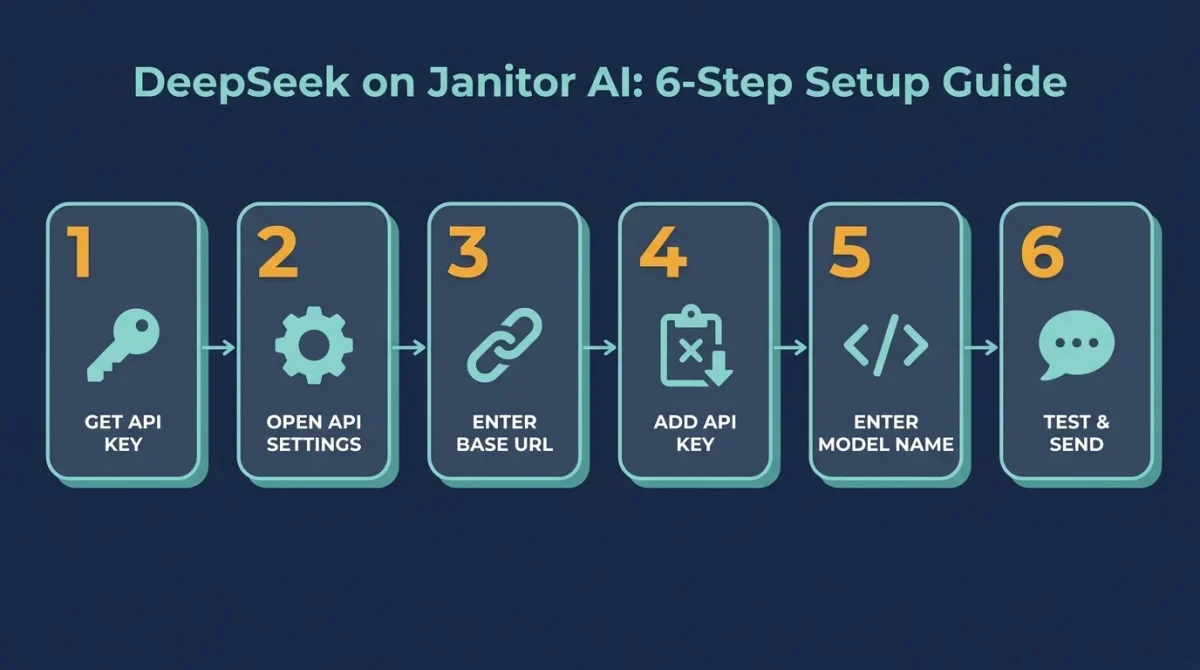
Step 1: Get Your DeepSeek API Key
You have two routes here. The right one depends on your use case.
Option A: DeepSeek Direct (Best for Power Users)
This method connects Janitor AI directly to DeepSeek’s servers. It gives you the lowest latency, the best pricing, and the most direct control.
- Go to platform.deepseek.com and create an account.
- Once logged in, navigate to the API Keys section of your dashboard.
- Click Create New API Key and give it a name (e.g., JanitorAI)
- Copy the key immediately; it will only be shown once.
- Add a small amount of credits to your account balance (even $2–$5 is sufficient to get started)
Security Note
Treat your API key like a password. Never paste it into a public forum, share it as a screenshot, or hard-code it anywhere visible. If it’s ever exposed, revoke it immediately from your DeepSeek dashboard and generate a new one.
Option B: OpenRouter (Best for Beginners)
OpenRouter acts as a proxy aggregator. One API key gives you access to multiple models, including DeepSeek, Claude, Mistral, and others. This is the recommended route if you switch between models often or want a single billing dashboard.
- Go to openrouter.ai and create a free account.
- Navigate to API Keys and generate a new key.
- Add credits to your account (free tier has limited requests; a paid tier removes rate limit issues)
- Note your chosen model identifier for DeepSeek V3: deepseek/deepseek-chat-v3-0324
Which route should you choose?
- Choose DeepSeek Direct if you want the lowest cost and plan to use DeepSeek exclusively.
- Choose OpenRouter if you want flexibility across multiple models or if you’re testing for the first time.
Step 2: Open API Settings in Janitor AI
Now that you have your key, it’s time to configure Janitor AI.
- Log in to Janitor AI and open a character chat (or create a new character)
- In the chat interface, look for the API Settings button; it’s typically in the top-right corner of the screen.
- A menu will open with your current API configuration.
At this point, you’ll see that the default provider is set to JanitorLLM. You need to switch this to an OpenAI-compatible mode.
Step 3: Enter the Correct Base URL
This is the step where most failed setups happen. The Base URL specifies where Janitor AI sends your requests. One wrong character here causes persistent errors. Enter the following, depending on your provider:
| Provider | Base URL |
| DeepSeek Direct | https://api.deepseek.com/v1 |
| OpenRouter | https://openrouter.ai/api/v1 |
The Beginner Mistake
Forgetting /v1 at the end of the URL. Without it, Janitor AI throws a persistent 404 or connection error that appears to be a server-side issue, but it’s simply a malformed address. Always double-check this before troubleshooting anything else.
Do not add /chat/completions to the end. Most systems include that path by default. Adding it manually will break the connection.
Step 4: Paste Your API Key
In the API Key field, paste the key you generated in Step 1.
- If you’re using DeepSeek Direct, paste your DeepSeek API key.
- If you’re using OpenRouter, paste your OpenRouter API key.
After pasting, click Check API Key or Save Settings (button label varies by interface). Janitor AI will attempt to verify the key.
If verification fails immediately, the most common causes are:
- Zero balance on your account (top up even $1)
- Copied the key with extra whitespace (re-copy carefully)
- The key was generated from a different project or sub-account.
Step 5: Enter the Model Name
Janitor AI requires you to specify the model name manually. It will not auto-detect this. If the field is left blank or contains a typo, you’ll get empty responses with no error message.
For DeepSeek Direct, Use One of These
| Model Name | Use Case |
| deepseek-chat | Standard DeepSeek V3 — best for most roleplay and creative writing |
| deepseek-reasoner | Thinking Mode / R1 model — best for complex, logic-heavy plotlines |
For OpenRouter, Use
| Model Name | Description |
| deepseek/deepseek-chat-v3-0324 | DeepSeek V3 via OpenRouter |
| deepseek/deepseek-r1 | DeepSeek R1 (Reasoning model) via OpenRouter |
If you’re not sure which to start with, go with deepseek-chat. It’s the most stable and best-suited for general roleplay use.
Step 6: Save Settings and Send a Test Message
Once all fields are filled in:
- Click Save or Apply in the API settings panel.
- Close the settings menu and return to the character chat.
- Send a short test message (e.g., “Hello, how are you?”)
If the response comes through cleanly, your setup is complete. If the chat loads indefinitely or throws an error, move to the troubleshooting section below.
Recommended Settings for Best Roleplay Performance
Once DeepSeek is connected, fine-tuning a few parameters can significantly improve response quality.
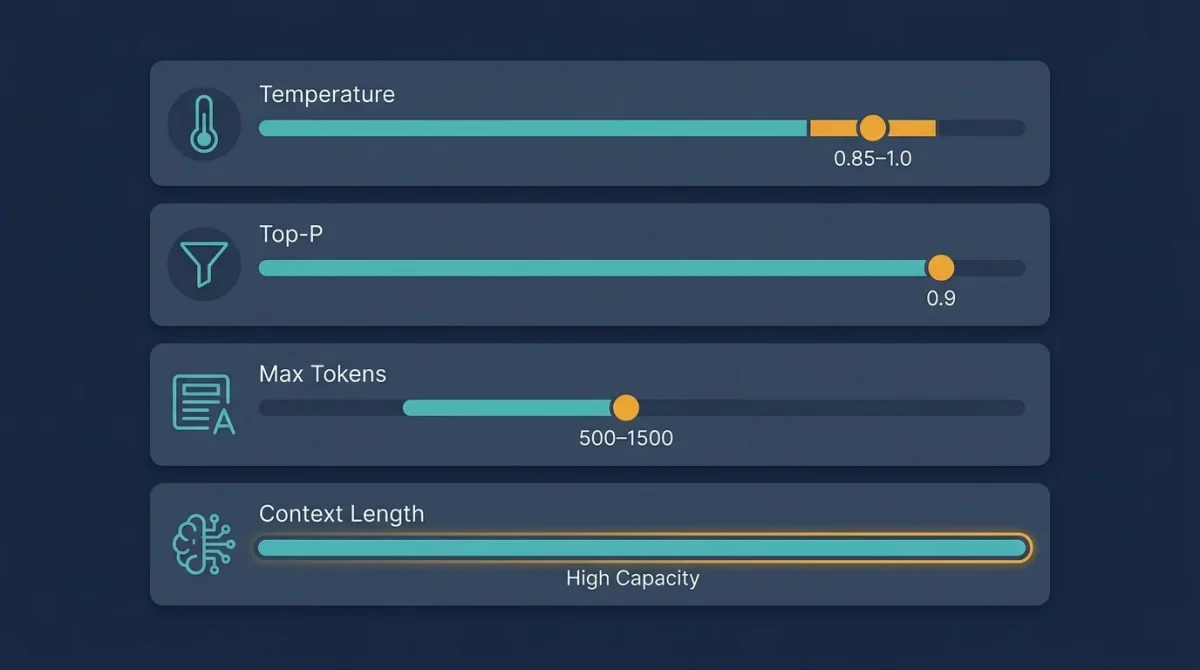
Temperature
Temperature controls how creative or random a model’s responses are, directly influencing tone and variability. Lower settings, around 0.3 to 0.5, produce controlled, consistent, and more factual outputs, making them suitable for precise or informational tasks. A mid-range setting between 0.7 and 1.0 offers a balanced level of creativity with good variety, which works well for most conversational and writing scenarios.
Higher values, such as 1.2 to 1.4, generate highly expressive chats and experimental responses, making them ideal for emotionally rich roleplay or creative storytelling. However, at these levels, responses can become less consistent and occasionally unpredictable, so they should be used with that trade-off in mind.
Recommended starting point: 0.85–1.0 for most Janitor AI users
Top-P (Nucleus Sampling)
Top-P controls how the model filters the pool of possible words at each step, influencing how diverse or focused the output feels. A value of 0.9 is generally recommended as the default for roleplay, as it provides a good balance between creativity and coherence. Lowering it below 0.8 tends to restrict the model too much, often leading to repetitive or predictable responses.
On the other hand, increasing Top-P above 0.95, especially when combined with a high temperature, can make the output overly random, sometimes resulting in looping or incoherent text. Finding the right balance is key to maintaining both creativity and clarity.
Max Tokens
This setting determines the maximum length of each response, which directly affects how complete and immersive the output feels. If set too low, responses may get cut off mid-sentence or mid-scene, especially in detailed roleplay scenarios.
For most use cases, a range of 500–800 tokens works well for average replies that are concise yet informative. For more immersive, narrative-style interactions, increasing the limit to 1000–1500 tokens allows the model to deliver richer, more detailed responses without interruption.
Context Length
Increase this to take advantage of DeepSeek’s 128K context window. The higher the context, the longer your character will remember the conversation. Set this to the highest level Janitor AI allows in your current plan.
Common Errors and How to Fix Them
| Error | Most Likely Cause | Fix |
| Network Error / Infinite Loading | Zero API balance | Add $1–$5 to your account — keys tied to empty accounts fail silently |
| 404 Not Found | Missing /v1 in Base URL | Re-check the URL and add /v1 at the end |
| Model Not Found | Typo in model name | Copy the model name exactly: deepseek-chat (lowercase, no extra characters) |
| Error 429 (Rate Limit) | Free tier limit hit | Wait 10 minutes, or upgrade to a paid OpenRouter/DeepSeek plan |
| Repetitive / Looping Text | Temperature too high | Lower the temperature to 0.7 and set Top-P to 0.9 |
| Empty Responses | Model name field blank | Fill in the model name — Janitor AI won’t auto-detect this |
| Proxy Error | Wrong URL format for the provider | Verify URL matches your provider exactly (no extra paths appended) |
DeepSeek Direct vs. OpenRouter: Which Is Better for Janitor AI?
This is a common question, and the answer depends on how you use the platform.
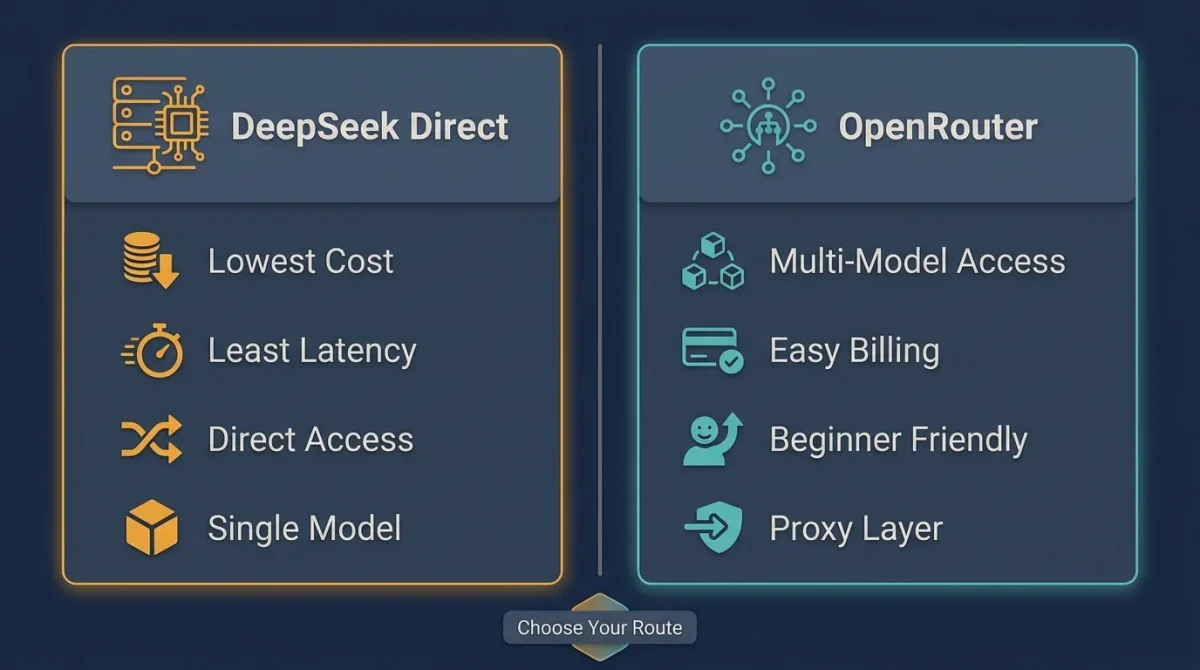
DeepSeek Direct is better if
DeepSeek Direct is the better option if you exclusively use DeepSeek and want to keep costs as low as possible. It is also ideal for users who are technically comfortable and prefer having direct access without relying on additional search platforms. Using it directly avoids potential latency introduced by a proxy or middleman layer, resulting in a faster, more efficient experience.
OpenRouter is better if
OpenRouter is the better choice if you want the flexibility to experiment with multiple models, such as DeepSeek, Claude, and Mistral, without having to manage separate integrations. It simplifies management by providing a single billing dashboard, eliminating the need to handle multiple accounts across different providers. This makes it especially useful for users who are newer to API setups and prefer a more guided, user-friendly onboarding experience.
For most casual-to-intermediate Janitor AI users, OpenRouter is the easier long-term choice. For heavy users focused purely on DeepSeek, going direct saves money over time.
Privacy Considerations
This is an important point to understand, especially if you’re new to BYOK (Bring Your Own Key) API setups. When you use DeepSeek Direct, your messages are sent to DeepSeek’s servers in China, meaning they fall under Chinese data jurisdiction with different data retention and access policies compared to US or EU-based providers. This doesn’t automatically make it unsafe, but it does mean you should be aware of how and where your data is handled.
If privacy is a concern, it’s wise to review DeepSeek’s official privacy policy before using the service and consider using a proxy layer, such as OpenRouter, for added separation. You should also avoid sending any personally identifiable information through third-party AI APIs. While millions of users safely use these integrations for purposes like roleplay, the key is understanding whose infrastructure your data passes through and making informed decisions accordingly.
Key Takeaways
DeepSeek uses an OpenAI-compatible API, enabling it to integrate seamlessly with Janitor AI’s existing settings. When configuring it, make sure the Base URL includes “/v1” at the end, as missing this small detail is one of the most common causes of setup failures. It’s also important to fund your API account before generating a key, as a zero balance can cause silent network errors in Janitor AI that are difficult to diagnose.
For most roleplay use cases, the “deepseek-chat” model is a strong starting point, while “deepseek-reasoner” can be used for more complex storytelling. Setting the temperature between 0.85 and 1.0 usually provides the best balance for expressive yet consistent AI character dialogue. Beginners are generally better off using OpenRouter for its ease of setup, while more experienced or dedicated users may prefer DeepSeek Direct for better long-term cost efficiency.
Frequently Asked Questions (FAQs)
Is DeepSeek free to use on Janitor AI?
DeepSeek is not entirely free; you pay for usage based on the tokens you generate. However, at approximately $0.20 per 1 million tokens, it is significantly cheaper than most alternatives. Light users can sustain months of usage on a $5 credit top-up.
What’s the difference between deepseek-chat and deepseek-reasoner?
deepseek-chat is the standard conversational model (DeepSeek V3) optimized for natural, flowing dialogue. deepseek-reasoner is the R1 reasoning model that uses a “thinking” process before responding, improving performance on complex plots, logical puzzles, or branching narratives that require continuity.
Why does Janitor AI keep showing a Network Error with DeepSeek?
The three most common causes are: (1) your API account balance is $0.00, (2) the Base URL is missing /v1, or (3) the model name has a typo. Work through each one in order before assuming the problem is on DeepSeek’s end.
Can I use DeepSeek on Janitor AI on mobile?
Yes. The configuration process is identical on mobile; the interface is simply more compact. The same fields (Base URL, API Key, Model Name) appear in the same settings menu.
Does using DeepSeek violate Janitor AI’s terms of service?
No. Janitor AI explicitly supports BYOK (Bring Your Own Key) integrations and provides the API settings interface for exactly this purpose. Connecting DeepSeek is an intended use case.
Is using OpenRouter better than connecting directly to DeepSeek?
Neither is objectively better; they serve different needs. OpenRouter offers model flexibility and a beginner-friendly dashboard. DeepSeek Direct offers lower cost and lower latency. Choose based on whether you want simplicity or efficiency.
What context length should I set in Janitor AI with DeepSeek?
Set it to the highest level Janitor AI allows within your account tier. DeepSeek V3 supports up to 128K tokens of context, meaning the model can track very long conversations without losing earlier details. Taking advantage of this is one of the biggest quality improvements over the default JanitorLLM.